
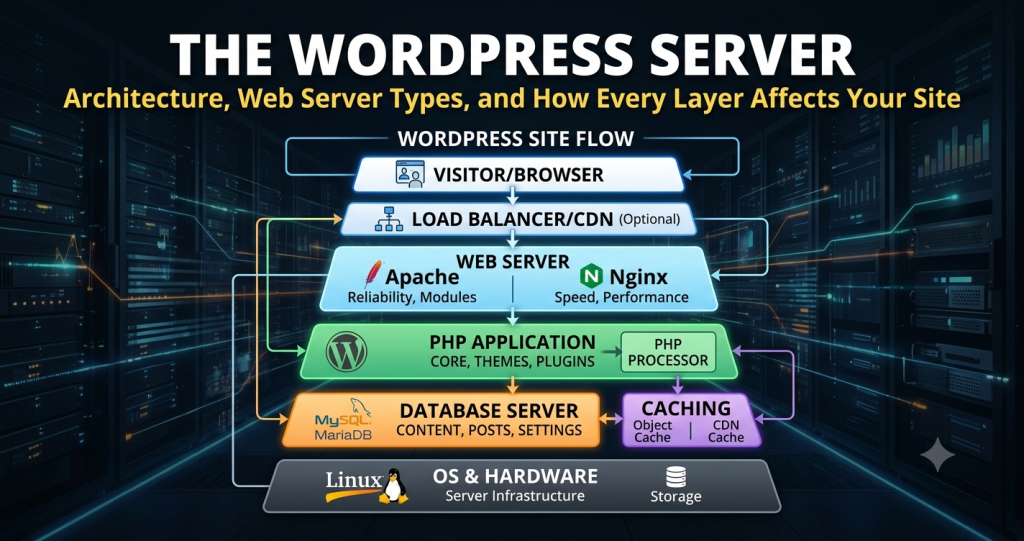
Scalable WordPress: Build It Yourself on the Cloud, or Let Someone Else Carry It
AWS, Azure, and Google Cloud can all run a high-traffic WordPress site. The real question for a growing Kenyan business isn’t whether it’s possible — it’s who ends up responsible for keeping it fast, patched, and online at 2am.
You can host WordPress on AWS, Azure, or GCP. Should you?
Any of the big three cloud platforms can technically run a scalable WordPress install. Compute, storage, and networking are all there for the buying. What isn’t included is the team that assembles those pieces into something that stays fast under load, patches itself before an exploit lands, and doesn’t fall over the day your traffic triples.
For most growing businesses, self-managing that stack turns out to be the expensive option — not because the cloud bill is high, but because of everything a team has to build and staff around it before the site is actually production-ready.
The gap shows up first in cost predictability.
Managed WordPress hosting typically prices around your traffic, in a way you can forecast. Raw cloud infrastructure prices around whatever you decide to build — and that number tends to grow every time your site does.
Pricing You Can Plan Around
A managed platform bundles infrastructure into a predictable rate tied to visitors. Self-hosted cloud costs shift with every architecture decision your team makes, which makes budgeting a moving target.
Someone Has to Own the Infrastructure
Traffic spikes — a viral post, a promotion, a seasonal rush — need infrastructure ready in advance. On raw cloud hosting, your team designs and triggers that scaling manually. A managed platform absorbs it automatically.
Core Updates Don’t Patch Themselves
WordPress core releases security patches regularly. On AWS, Azure, or GCP, applying them is your team’s job. A managed host keeps core current as part of the service.
Support at 2am
Cloud providers will support their own infrastructure — not your specific WordPress configuration. If something breaks in your setup, your team is the support desk unless you’ve built or bought that expertise elsewhere.
The tradeoff: focus on content, or focus on infrastructure.
Every operational capability a fast, reliable site needs — caching, search, monitoring, load balancing, DDoS mitigation — exists on the major clouds. None of it comes switched on. Someone has to configure it, tune it, and keep tuning it as traffic patterns change.
Integrations
Managed WordPress platforms typically ship with REST and GraphQL APIs ready to connect to third-party tools. On raw cloud infrastructure, each integration usually means standing up its own gateway, compute, and storage layer.
Scaling, Load Balancing & CDN
Horizontal and vertical scaling, load balancing, and content delivery are handled automatically by a managed platform. On AWS, Azure, or GCP, your team designs, provisions, and maintains all three.
Caching
Object, page, and query caching come built into a managed stack. On self-managed cloud infrastructure, caching is a configuration project your team owns and has to keep maintaining as the site evolves.
Search
Default WordPress search struggles at scale. Enterprise-grade search is often a toggle on a managed platform, versus custom development work when you’re hosting it yourself on the cloud.
Monitoring
Cloud providers give you monitoring tools, but deciding what to watch and how to interpret it is on your team. A managed platform’s dashboard is built specifically around WordPress health.
DDoS Protection
Rate limiting, throttling, and IP restrictions exist on the major clouds, but they’re opt-in features your team has to configure. A managed platform typically includes this protection from day one.
Security by default, vs. security by assignment.
Cloud providers give you the building blocks for a secure site — firewalls, encryption, scanning tools — but the responsibility for wiring them together sits with your team. A managed WordPress platform folds most of this into the service itself.
Software Supply Chain
Vulnerability scanning is often built into a managed platform. On raw cloud infrastructure, it’s a separate tool and process your team has to run.
Network & Host Hardening
Firewalling and OS/server hardening are usually handled for you on a managed stack. Cloud platforms offer the option to add these — configuring and maintaining them is on you.
Application & File System
A read-only file system and secure-by-design architecture reduce common WordPress attack surfaces on a managed platform. Application-layer security on raw cloud hosting is your team’s responsibility to design.
Encryption, Auditing & Scanning
Encryption at rest and in transit, audit logging, and automated code scanning typically come standard with a managed platform. On self-hosted cloud infrastructure, each is a separate setup task.
Where the responsibility actually sits.
Neither option is wrong — they’re built for different situations. This is roughly how the responsibility splits between a managed WordPress platform and a self-built AWS, Azure, or GCP stack.
| Capability | Managed WordPress Platform | Self-Managed Cloud (AWS / Azure / GCP) |
|---|---|---|
| Predictable pricing | Included | Varies with usage |
| Infrastructure & scaling handled for you | Included | Team builds & maintains |
| WordPress core kept up to date | Included | Team’s responsibility |
| 24/7 WordPress-specific support | Included | Provider covers platform only |
| Caching, CDN & load balancing | Included | Configured by your team |
| Enterprise search | Turn it on | Custom build required |
| DDoS protection | Included | Opt-in, self-configured |
| Security scanning & audit logging | Included | Team’s tooling & process |
| Full infrastructure control | Limited by design | Unlimited |
The right choice depends on what your team is already staffed for.
If you already run engineering resources dedicated to cloud infrastructure elsewhere in the business, you may have the expertise on hand to self-host WordPress on AWS, Azure, or GCP — and full architectural control is a genuine advantage of that route.
The harder question is bandwidth, not capability: does that team have room to take on WordPress specifically, and will it get the ongoing attention it needs once the initial build is done? Cost also tends to climb quietly as you add cloud services to absorb peak traffic.
A managed WordPress platform trades some infrastructure control for a predictable bill, shared security ownership, and a team whose job is making sure your site holds up under real traffic — freeing your budget and your people to focus on the content and the business, not the servers underneath it.
Either path is workable. The point is choosing it deliberately, before a traffic spike or a missed patch makes the decision for you.
Get an honest read on your infrastructure options.
Whether you’re weighing a move to AWS, Azure, or GCP, or wondering if a managed WordPress platform fits your traffic and budget better, we’ll walk you through the tradeoffs for your specific situation.