

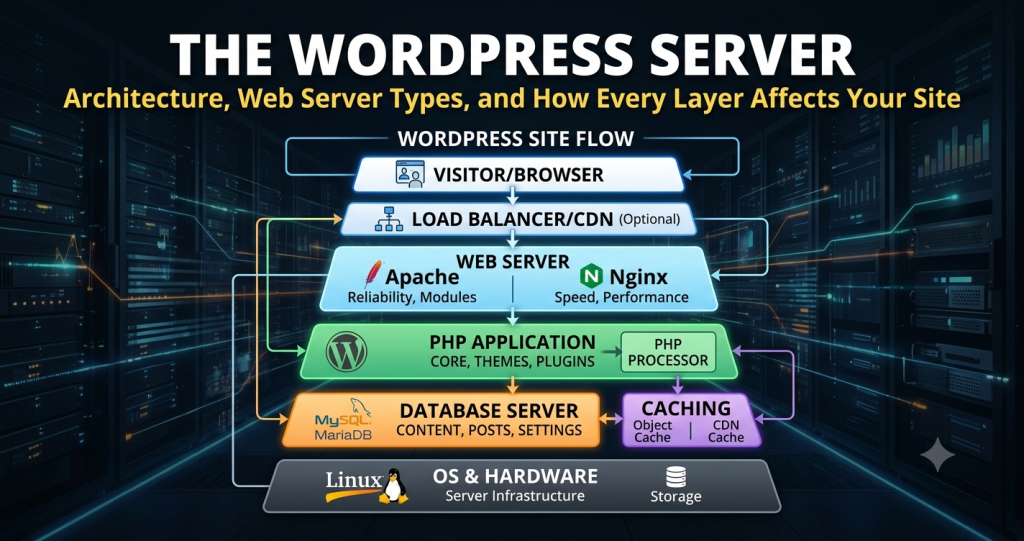
Caching is where WordPress server architecture diverges most sharply from other application types. A well-layered caching stack is the difference between a server that handles 500 concurrent users and one that collapses under 50. Each layer serves a distinct purpose and operates at a different point in the request lifecycle — and together, they stack multiplicatively rather than act as alternatives.
-
Full-Page Cache
The highest-impact single caching layer for WordPress. After the first request, the complete rendered HTML for a given URL is stored and served directly from that copy on all subsequent requests — bypassing PHP execution and database queries entirely. This is implemented at the web server level — LiteSpeed LSCache, NGINX FastCGI cache, or Varnish — or just above it.
Cache vary rules govern which requests receive cached responses. Typically, logged-in users, cart pages on WooCommerce sites, and query-string URLs bypass the full-page cache entirely. Getting these exclusions right is non-negotiable: over-caching breaks dynamic functionality; under-caching eliminates the performance benefit entirely.
-
Object Cache: Redis and Memcached
WordPress’s object cache stores the results of expensive database queries and computational operations in memory, making them available across subsequent page loads. By default, this cache is non-persistent — it only survives within a single request. A persistent object cache backed by Redis or Memcached extends this across requests, dramatically reducing database server load.
Redis is the preferred choice for most WordPress deployments. Unlike Memcached, it supports data persistence (surviving server restarts), richer data structures beyond simple key-value pairs, and atomic operations — all of which make it better suited to WordPress transients, session storage, and WooCommerce session data. Activation requires the
WP_CACHEconstant and a drop-inobject-cache.phpfile placed inwp-content/. -
OPcache (PHP Bytecode Cache)
OPcache eliminates the parse-and-compile overhead that PHP would otherwise incur on every request. It operates transparently below WordPress’s application layer and is complementary to, not a substitute for, the layers above it. On a full-page cache HIT, OPcache is largely irrelevant — PHP never runs. On a cache MISS, OPcache significantly reduces the time to first byte by cutting PHP execution time for that uncached request.
-
CDN Edge Caching
A Content Delivery Network distributes static assets — images, CSS, JavaScript, fonts — to edge nodes geographically close to each visitor, reducing latency regardless of origin server location. For WordPress, CDN integration operates at two levels: static asset delivery (high cache-hit rate, always cacheable) and edge-level full-page caching for HTML (more complex, requiring careful cache invalidation).
Cloudflare, the most widely used CDN layer for WordPress, can cache full HTML pages at its edge nodes via Page Rules or Cache Rules — effectively relocating the full-page cache from the origin data center to the CDN edge globally. This dramatically reduces origin load and improves response times for high-traffic sites. Cache invalidation on content publish requires either Cloudflare’s Cache Purge API or a WordPress plugin integration that triggers purges automatically on content updates.
-
Browser Cache
HTTP cache headers —
Cache-Control,Expires,ETag— instruct the visitor’s browser to store static assets locally and avoid re-fetching them on repeat visits. These are configured at the web server level. The standard WordPress approach is long cache lifetimes on versioned assets (CSS and JS files with content-hash filenames) and short lifetimes on HTML pages, ensuring visitors always receive fresh content while minimising repeat bandwidth consumption on static resources.
These layers are not alternatives — they are complementary and interact across the full request lifecycle. A request served from CDN edge costs zero origin server resources. A CDN miss that hits the NGINX full-page cache costs zero PHP or database resources. A miss at both levels still hits PHP with OPcache active — fast — and Redis object cache active, avoiding slow MySQL queries. Only a complete miss at every layer triggers the full WordPress PHP + MySQL execution cycle, drawing on CPU and RAM at the origin. For managed WordPress hosting environments, many of these layers are pre-configured — but understanding how they interact is essential for diagnosing cache behaviour on any stack.
