

The WordPress Database Server: MySQL vs MariaDB, Configuration, and Performance
A complete technical reference for the WordPress database layer — covering MySQL vs MariaDB, InnoDB buffer pool tuning, query optimisation, connection pooling, object caching integration, and how every database decision affects your site’s speed, reliability, and scalability.
When a visitor requests an uncached WordPress page, the web server hands the request to PHP, which then fires a series of SQL queries against the database before a single byte of HTML can be assembled. The database is not a passive storage layer — it is an active participant in every dynamic page load. Its configuration determines whether those queries complete in 1ms or 80ms, whether the server collapses under concurrent traffic, and whether a corrupted table takes your site offline for hours or minutes.
WordPress uses either MySQL or its drop-in compatible fork MariaDB as its relational database engine. Both are supported natively by WordPress and are functionally interchangeable for the majority of deployments. Understanding what separates them — and how to configure either for WordPress workloads — is the subject of this guide. Database decisions compound: a poorly tuned server with missing indexes and an oversized autoload payload can add 500ms to every uncached request, completely undermining gains made at the caching layer or through PHP optimisation.
Section 1
The Database Server’s Role in the WordPress Stack
WordPress stores all its persistent data in a relational database. Posts, pages, comments, users, plugin settings, theme options, navigation menus, and transient data all live in MySQL/MariaDB tables. The WordPress core data access layer ($wpdb) translates application logic into SQL queries on every dynamic request. There is no internal file-based persistence for content — the database is the authoritative data store.
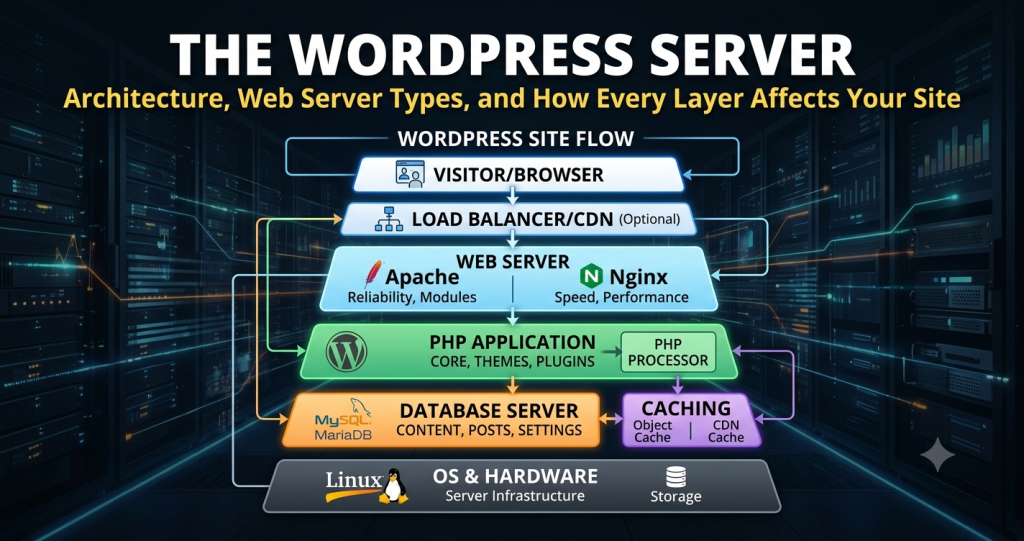
In the context of the full WordPress server stack, the database layer sits downstream of PHP. The web server (Apache, NGINX, or LiteSpeed) accepts HTTP connections and passes dynamic requests to PHP-FPM. PHP executes WordPress, which queries the database, assembles the response, and returns HTML to the web server for delivery. The database is not contacted for cached requests — full-page caching at the server-side caching layer bypasses both PHP and the database entirely.
Apache, NGINX, or LiteSpeed. Serves cached responses directly. Passes cache misses to PHP-FPM via FastCGI — the database is not contacted.
PHP-FPM workers execute WordPress. On a cache miss, PHP builds the page by issuing multiple SQL queries to the database via $wpdb.
MySQL or MariaDB receives SQL queries, retrieves data from the InnoDB buffer pool (RAM) or disk, and returns result sets to PHP.
Redis or Memcached intercepts repeated database queries and serves cached results in memory, reducing actual SQL traffic to the database engine.
Key principle: The database’s performance directly controls the floor on Time to First Byte (TTFB) for uncached requests. Caching layers above it reduce the frequency of database hits — but when the database is queried, it must respond quickly. Every millisecond added by slow queries, connection overhead, or inadequate buffer pool RAM appears directly in TTFB measurements.
What WordPress Stores in the Database
A default WordPress installation creates a fixed set of tables with the prefix wp_ (configurable in wp-config.php). Understanding the purpose of each table is prerequisite to diagnosing query performance and schema-level problems.
| Table | Contents | Performance notes |
|---|---|---|
wp_posts |
Posts, pages, attachments, revisions, nav menu items, custom post types | Largest table on content-heavy sites. Full-text search on large archives is slow without proper indexing or search plugins offloading to Elasticsearch. |
wp_postmeta |
Key-value metadata attached to posts (custom fields, plugin data, WooCommerce product data) | Grows very large with WooCommerce or ACF. N+1 query patterns on meta lookups are a common performance killer. Indexed on post_id and meta_key. |
wp_options |
Site-wide configuration, plugin settings, transients, theme options, autoloaded data | The most common source of performance problems. All autoload='yes' rows are loaded on every request. Bloated autoload payload is a critical issue on plugin-heavy sites. |
wp_users |
User accounts — login credentials (hashed), email, display name, registration date | Small and fast on most sites. Can become a bottleneck on membership sites with tens of thousands of users combined with complex capability queries. |
wp_usermeta |
Per-user metadata — roles, capabilities, plugin-specific user data | Grows proportionally with user count and plugin count. Heavy usermeta queries are common on membership and LMS platforms. |
wp_comments / wp_commentmeta |
Published and pending comments; per-comment metadata | Comment spam accumulation can cause significant table bloat. Regular spam purges are good maintenance hygiene. |
wp_terms / wp_term_taxonomy / wp_term_relationships |
Categories, tags, custom taxonomies, and their assignments to posts | Term queries are heavily used in archive pages and nav menus. Generally fast with default indexes on properly maintained tables. |
| Plugin custom tables | WooCommerce orders, WPForms submissions, event plugin data, analytics tables | Quality varies enormously. Some plugins create large, unindexed tables with poor query patterns. Regular audits of custom table sizes and slow queries are warranted on complex sites. |
Section 2
MySQL vs MariaDB: Architecture, Differences, and Which to Choose
MySQL and MariaDB are both relational database management systems (RDBMS) that implement the SQL standard and use the InnoDB storage engine as their default. WordPress supports both; the connection string in wp-config.php is identical. The two systems diverged when MariaDB was forked from MySQL in 2009, following Oracle’s acquisition of Sun Microsystems (which owned MySQL). Since then, both projects have evolved independently — maintaining API and SQL syntax compatibility while diverging in internals.
MySQL
MySQL is the original and most widely deployed open-source relational database in the world. MySQL 8.0 introduced significant performance improvements: a new data dictionary stored in InnoDB (replacing file-based system tables), improved JSON support, window functions, and a rewritten optimizer with improved cost models. The MySQL 8.0 default character set is utf8mb4 — correct for WordPress, which requires utf8mb4 to support emoji and full Unicode range characters.
MySQL is the standard choice for managed hosting environments, AWS RDS, Google Cloud SQL, and enterprise deployments. Its conservative versioning and broad support matrix make it the safer choice in environments with strict compliance requirements or where compatibility with third-party tooling is critical.
MariaDB
MariaDB was created by MySQL’s original development team and maintains drop-in compatibility — it reads the same configuration files, uses the same SQL syntax, and accepts the same wp-config.php connection parameters as MySQL. Functionally, switching a WordPress installation from MySQL to MariaDB requires no code changes.
Where MariaDB diverges architecturally is in its thread pool implementation, query optimizer, and storage engine ecosystem. MariaDB’s thread pool handles high-concurrency WordPress workloads more efficiently than MySQL’s default one-thread-per-connection model — particularly significant for high-traffic WordPress sites where hundreds of simultaneous PHP-FPM workers may be contending for database connections. MariaDB also ships with the Aria storage engine (a crash-safe alternative to MyISAM for internal tables) and has historically had a faster release cadence for query optimizer improvements.
| Factor | MySQL 8.0+ | MariaDB 10.6+ |
|---|---|---|
| WordPress compatibility | ✓ Full | ✓ Full (drop-in compatible) |
| InnoDB storage engine | Oracle InnoDB | MariaDB InnoDB fork (Barracuda) |
| Thread pool | Enterprise edition only | ✓ Built-in (Community) |
| High concurrency WordPress | Good (one-thread-per-connection default) | Better (thread pool included) |
| Query optimizer | Cost-based, improved in 8.0 | Cost-based with additional heuristics, generally more aggressive |
| JSON support | ✓ Strong (native JSON type) | ✓ Compatible (JSON alias for LONGTEXT) |
| utf8mb4 default charset | ✓ MySQL 8.0+ | ✓ MariaDB 10.4+ |
| Aria storage engine | ✗ | ✓ Crash-safe internal tables |
| Managed cloud services | AWS RDS, Cloud SQL, Azure Database | AWS RDS (MariaDB), DigitalOcean Managed DB, Linode Managed DB |
| Licence | GPL2 (Community) / Commercial | GPL2 |
| Support model | Oracle (commercial support available) | MariaDB Foundation + MariaDB Corporation |
Which to choose for WordPress: For new self-managed deployments, MariaDB 10.6+ is the preferred choice due to its built-in thread pool and more aggressive query optimiser under concurrent workloads. For managed hosting or cloud environments where the database is provided as a service (AWS RDS, Google Cloud SQL), MySQL 8.0 is more universally available and equally capable. The configuration and tuning principles in this guide apply to both — the parameter names and my.cnf structure are identical.
Section 3
InnoDB Engine Configuration and Buffer Pool Tuning
Both MySQL and MariaDB use the InnoDB storage engine as the default for all WordPress tables. InnoDB provides ACID-compliant transactions, row-level locking (critical for concurrent WordPress writes), foreign key support, and crash recovery via its redo log. The performance of InnoDB under WordPress workloads is almost entirely determined by three configuration areas: the buffer pool, the redo log, and the flush behaviour. These are set in the database server’s configuration file (/etc/mysql/my.cnf or /etc/my.cnf depending on distribution).
The InnoDB Buffer Pool
The InnoDB buffer pool is a region of RAM that caches database pages (data and indexes) in memory. When a query reads a row, InnoDB checks the buffer pool first — a buffer pool hit returns data in microseconds, while a buffer pool miss triggers a disk read, which is orders of magnitude slower even on NVMe SSDs. The goal is to keep the entire active database working set (the subset of data accessed under normal traffic) resident in the buffer pool at all times, eliminating disk reads for repeat queries.
The innodb_buffer_pool_size parameter controls the buffer pool allocation. On a dedicated database server, set this to approximately 70–75% of total RAM. On a shared server running web server, PHP-FPM, and MySQL/MariaDB on the same machine, reserve RAM for the OS, PHP-FPM workers, and web server process, typically leaving 40–50% of total RAM for the buffer pool.
# /etc/mysql/my.cnf or /etc/my.cnf
# InnoDB core configuration for WordPress

[mysqld]

# Buffer pool: ~70% RAM on dedicated DB, ~40-50% on shared server
innodb_buffer_pool_size        = 2G   # Example: 3GB server, dedicated DB
innodb_buffer_pool_instances   = 2    # 1 per GB, up to 8

# Redo log — larger = better write performance, slower crash recovery
innodb_log_file_size           = 256M
innodb_log_buffer_size         = 64M

# Flush behaviour — balance durability vs write performance
innodb_flush_log_at_trx_commit = 2   # 1=full ACID, 2=good for WordPress
innodb_flush_method            = O_DIRECT # Bypass OS cache (dedicated DB)

# I/O capacity — set to IOPS ceiling of your storage
innodb_io_capacity             = 2000  # SSD: 2000-20000; HDD: 200
innodb_io_capacity_max         = 4000

# File per table — each table in its own .ibd file (easier maintenance)
innodb_file_per_table          = 1

# Row format — required for WordPress utf8mb4 full support
innodb_default_row_format      = DYNAMIC
Connection and Query Configuration
# Connection limits — calibrate to PHP-FPM max_children
max_connections                = 200   # Must exceed PHP-FPM pm.max_children
max_allowed_packet             = 64M   # Accommodate large post content
wait_timeout                   = 60    # Reclaim idle connections promptly
interactive_timeout            = 60

# Query cache — DISABLED in MySQL 8.0 (removed); use Redis instead
query_cache_type               = 0    # Set 0 in MySQL 5.7 to disable
query_cache_size               = 0

# Slow query log — essential for performance diagnosis
slow_query_log                 = 1
slow_query_log_file            = /var/log/mysql/slow.log
long_query_time                = 1    # Log queries over 1 second
log_queries_not_using_indexes  = 1    # Catch missing index queries

# Character set — critical for WordPress emoji/Unicode support
character-set-server           = utf8mb4
collation-server = utf8mb4_unicode_ciMariaDB-Specific Thread Pool Configuration
On MariaDB, enabling the thread pool reduces the overhead of managing many simultaneous connections from PHP-FPM workers — each thread in the pool handles multiple connections, rather than the default one-thread-per-connection model.
# MariaDB thread pool (not available in MySQL Community Edition)
thread_handling                = pool-of-threads
thread_pool_size               = 8    # Match to CPU core count
thread_pool_max_threads        = 200
thread_pool_idle_timeout       = 60
Section 4
The WordPress Schema: Tables, Autoload, and the wp_options Problem
The most common database-layer performance problem on production WordPress sites is not query execution speed — it is the autoloaded payload in wp_options. Understanding why this happens requires understanding how WordPress bootstraps on every request.
The wp_options Autoload Mechanism
WordPress’s options API stores configuration data in wp_options as key-value pairs. The autoload column determines whether a row is loaded during WordPress initialisation. Rows with autoload='yes' are retrieved in a single bulk query at bootstrap — before any content is rendered, before plugins have processed the request, before any caching plugin has had the opportunity to serve cached output.
-- This query runs on EVERY WordPress request (uncached)
SELECT option_name, option_value
FROM wp_options
WHERE autoload = 'yes';
This is an intentional design decision — autoloading avoids per-option queries for frequently-needed settings. The problem arises when plugins use autoload='yes' for data that is not needed on every request: large serialised arrays, plugin-generated HTML fragments, cached API responses, or entire configuration datasets. The total autoloaded payload of a freshly installed WordPress site with no plugins is approximately 10–30KB. Production sites with a typical plugin complement can accumulate 500KB–5MB+ of autoloaded data — all of which is fetched on every uncached request.
-- Run in phpMyAdmin, MySQL Workbench, or via WP-CLI: wp db query
SELECT
  SUM(LENGTH(option_value)) AS total_autoload_bytes,
  COUNT(*) AS total_autoload_rows
FROM wp_options
WHERE autoload = 'yes';

-- Identify the largest individual autoloaded options
SELECT option_name, LENGTH(option_value) AS size_bytes, autoload
FROM wp_options
WHERE autoload = 'yes'
ORDER BY size_bytes DESC
LIMIT 20;
A total autoloaded payload above 800KB warrants investigation. Options above 100KB each should be reviewed — many can be set to autoload='no' if the data is only needed on specific pages or admin contexts, or migrated to a custom table with appropriate indexing.
Transient Proliferation
WordPress transients — temporary data stored via set_transient() — are persisted in wp_options by default, as pairs of rows: one for the value and one for the expiration timestamp. Plugins that use transients heavily (social feed plugins, API-caching plugins, WooCommerce extensions) can create thousands of transient rows in wp_options, growing the table significantly over time.
Expired transients are not automatically cleaned up without a scheduled cron job. On busy sites, WordPress’s background cron may not run frequently enough to keep up with transient generation. The result is a bloated wp_options table where a large fraction of rows are expired, stale transients occupying space and slowing full table scans.
-- Count and size of expired transients
SELECT
  COUNT(*) AS expired_transients,
  SUM(LENGTH(option_value)) AS total_bytes
FROM wp_options
WHERE option_name LIKE '_transient_timeout_%'
  AND CAST(option_value AS UNSIGNED) < UNIX_TIMESTAMP();

-- Delete expired transients (run during low-traffic period)
DELETE FROM wp_options
WHERE option_name LIKE '_transient_timeout_%'
  AND CAST(option_value AS UNSIGNED) < UNIX_TIMESTAMP();

DELETE FROM wp_options
WHERE option_name LIKE '_transient_%'
  AND option_name NOT IN (SELECT CONCAT('_transient_timeout_', SUBSTRING(option_name, 12))
                          FROM wp_options WHERE option_name LIKE '_transient_timeout_%');
With a Redis object cache active, transients are stored in Redis rather than wp_options — with native TTL support at the Redis level, so expired transients are automatically evicted. This is the recommended architecture for any site experiencing transient-related table bloat.
Section 5
Query Performance, Indexing, and Slow Query Analysis
WordPress's default table indexes are well-designed for standard content retrieval patterns. Performance problems typically originate from three sources: plugin-generated queries with poor index utilisation, large datasets that outgrow the query patterns originally designed for smaller sites, and N+1 query patterns where a loop fires one query per iteration rather than a single batched query.
Understanding the WordPress Query Pattern
A typical uncached WordPress front-page request fires queries in this approximate sequence:
-
1Autoload fetch
Single bulk query retrieving all
autoload='yes'rows fromwp_options. Runs at WordPress bootstrap before anything else. -
2Main WP_Query
The primary content query, typically fetching posts matching the current URL's context (homepage, archive, single post). This is the query most affected by WordPress core query construction and custom
query_postsorpre_get_postsmodifications. -
3Post meta, taxonomy, and term queries
Metadata, categories, and tags for each retrieved post. On archive pages displaying 10 posts, this can mean 10× the per-post overhead — N+1 patterns appear here without eager loading.
-
4Navigation menu and widget queries
Navigation menus are stored as custom post type hierarchies, each requiring their own term relationship and post queries. Widget areas firing their own database lookups add further overhead.
-
5Plugin-generated queries
Sidebar widgets, related posts, social proof counters, recently viewed products, WooCommerce cart fragments — each active plugin area adds its own query footprint.
Query Monitor: Per-Request Visibility
The Query Monitor WordPress plugin is the primary tool for identifying database performance problems at the WordPress application layer. It logs every query fired during a request, including execution time, calling function, and the query text — surfacing duplicate queries, slow queries, and queries missing indexes directly in the WordPress admin bar.
# Install and activate via WP-CLI
wp plugin install query-monitor --activate

# View slow query log summary (on the server)
mysqldumpslow -s t -t 20 /var/log/mysql/slow.log

# Explain a specific slow query to identify missing indexes
EXPLAIN SELECT * FROM wp_postmeta
WHERE meta_key = '_price' AND meta_value < '100';

# Check index usage on wp_postmeta
SHOW INDEX FROM wp_postmeta;

# Add a composite index if meta_key + meta_value queries are slow
ALTER TABLE wp_postmeta ADD INDEX meta_key_value (meta_key, meta_value(20));
WP-CLI for Database Diagnostics
The WordPress CLI (WP-CLI) provides direct database access for diagnostics and maintenance without requiring a MySQL shell:
# Check total database size
wp db size --tables

# Run a query directly
wp db query "SELECT option_name, LENGTH(option_value) as size FROM wp_options WHERE autoload='yes' ORDER BY size DESC LIMIT 10;"

# Optimise all tables (reclaim space after large deletions)
wp db optimize

# Repair tables after unexpected shutdown
wp db repair

# Check table integrity
wp db check
Section 6
Reducing Database Load With Redis and Memcached
The most impactful intervention for WordPress database performance is deploying a persistent object cache. WordPress's internal object cache is non-persistent by default: it accumulates results within a single PHP request and discards them completely when the request ends. Every new request starts with an empty cache and re-fires all queries from scratch. A persistent object cache backed by Redis or Memcached changes this: query results survive across requests, and subsequent page loads retrieve data from memory rather than the database.
Redis for WordPress
Redis is the preferred persistent object cache backend for WordPress. It supports data persistence (cache survives Redis restarts via RDB snapshots or AOF logging), atomic operations (required for correct cache invalidation), and rich data structures beyond simple key-value pairs. For WooCommerce specifically, Redis handles session storage, cart fragments, and transient caching more reliably than Memcached.
# Install Redis (Ubuntu/Debian)
apt install redis-server

# Configure Redis for WordPress object caching (/etc/redis/redis.conf)
maxmemory              256mb           # Allocate dedicated memory
maxmemory-policy       allkeys-lru     # Evict least-recently-used on full
save                   ""              # Disable persistence for pure cache use
bind                   127.0.0.1       # Bind to localhost only
requirepass            your_password   # Require authentication

# wp-config.php additions for Redis
define('WP_CACHE', true);
define('WP_REDIS_HOST', '127.0.0.1');
define('WP_REDIS_PORT', 6379);
define('WP_REDIS_PASSWORD', 'your_password');
define('WP_REDIS_DATABASE', 0);
define('WP_REDIS_PREFIX', 'mysite_'); // Namespace for multisite
Install the Redis Object Cache WordPress plugin to deploy the object-cache.php drop-in to wp-content/. This drop-in intercepts WordPress's internal object cache API and routes it to Redis. No code changes are required in WordPress core, plugins, or themes — the caching layer is transparent to the application.
Redis vs Memcached for WordPress
| Feature | Redis | Memcached |
|---|---|---|
| Data persistence | ✓ RDB + AOF snapshots | ✗ Memory only |
| Data structures | Strings, lists, hashes, sets, sorted sets | Key-value only |
| WooCommerce session storage | ✓ Reliable | ~ Functional but less reliable |
| WordPress transients | ✓ Stores in Redis with TTL | ✓ Stores in Memcached with TTL |
| Atomic operations | ✓ | ~ Limited (CAS only) |
| Horizontal scaling | Redis Cluster / Sentinel | Native multi-server sharding |
| Memory efficiency | Good | Slightly lower overhead per item |
| Recommended for WordPress | ✓ Primary recommendation | ✓ Acceptable for read-heavy caches |
Section 7
Connection Management, Pooling, and max_connections
Each PHP-FPM worker that processes a WordPress request opens a connection to MySQL/MariaDB. With PHP's default persistent connections disabled, a new connection is established for each request and closed on completion. The max_connections parameter in MySQL/MariaDB sets the ceiling on simultaneous open connections — exceeding it causes WordPress to display "Error establishing a database connection" and return HTTP 500 errors to visitors.
The relationship between PHP-FPM and MySQL connection limits is direct: max_connections must be greater than or equal to pm.max_children in PHP-FPM, because each PHP worker may hold a connection open for the duration of its request. On a high-traffic site with 100 PHP-FPM workers, max_connections = 150 provides sufficient headroom for workers plus any monitoring or administrative connections.
max_connections lower than active PHP-FPM workers causes "Error establishing a database connection" under load. Immediate fix: increase max_connections or reduce pm.max_children.
Setting max_connections very high (1000+) without adequate RAM causes memory exhaustion — each idle connection consumes 1–8MB of MySQL memory, plus the per-connection thread overhead.
PHP scripts with external API calls or slow operations hold database connections open for extended periods, blocking other workers. Set wait_timeout=60 to reclaim idle connections promptly.
For sites with very high PHP worker counts, ProxySQL multiplexes many application connections over a smaller pool of real MySQL connections, reducing per-connection overhead and enabling connection reuse across requests.
# Diagnose connection usage in real time
SHOW STATUS LIKE 'Threads_connected';    -- Current open connections
SHOW STATUS LIKE 'Max_used_connections'; -- Peak connections since restart
SHOW STATUS LIKE 'Connection_errors%';   -- Connection failure counts
SHOW PROCESSLIST;                        -- Current active queries + wait states

# If Max_used_connections approaches max_connections, increase the limit
# Rule of thumb: max_connections = pm.max_children + 20% headroom
Section 8
Dedicated Database Server vs Shared Stack
A default WordPress deployment runs the web server, PHP-FPM, and MySQL/MariaDB on a single server instance. This is practical and cost-effective for low to medium traffic — it eliminates network latency between the application and database layers, simplifies administration, and requires only one server to maintain. For most WordPress sites under 50,000 monthly visitors, a well-configured single-server stack is entirely sufficient.
The case for separating the database onto its own server (or managed database service) arises when resource contention between the application tier and the database tier becomes measurable. MySQL's buffer pool competes with PHP-FPM's worker memory for the same physical RAM — on a VPS with 4GB RAM, allocating 2GB to InnoDB leaves only 2GB for the OS, web server, and all PHP-FPM workers. On a busy site, this constraint forces smaller PHP worker pools, which limits concurrency.
| Architecture | Best for | Trade-offs |
|---|---|---|
| Single server (LAMP/LEMP) | Sites under ~50K monthly visitors, small budgets, development environments | Resource contention between PHP and MySQL on high-traffic spikes; single point of failure |
| Dedicated DB server | High-traffic sites, WooCommerce stores, staging/production parity | Network latency between app and DB (keep <1ms on private network); higher infrastructure cost |
| Managed database service | Teams without Linux server administration expertise; regulated environments needing automated backups and failover | Higher cost than self-managed; less low-level configuration control; network egress costs on some providers |
| Read replica | Very high read:write ratio sites; WooCommerce analytics offloading; reporting queries | Replication lag introduces eventual consistency (not suitable for all WordPress queries); requires application-level read/write splitting |
When deploying a separate database server, the connection between the web server and database must be on a private network (VPC or internal network interface) — not over the public internet. The target round-trip latency between the two servers is under 1ms on the same data centre's internal network. Network latency above 5ms on the database connection measurably degrades TTFB for uncached requests because each query incurs that latency as a floor, and multiple sequential queries compound it.
Section 9
Managed Database Services for WordPress
Managed database services offload the operational burden of MySQL/MariaDB administration to the cloud provider: installation, configuration, patching, automated backups, failover, and scaling are handled by the service. The WordPress team connects via the standard MySQL connection string — there is no change to application code. The trade-off is cost (managed services are more expensive per unit of compute than self-managed) and reduced low-level configuration access (some tuning parameters are provider-managed).
Supports MySQL 8.0 and MariaDB 10.6. Multi-AZ deployments provide synchronous standby with automatic failover. Read replicas for read scaling. Performance Insights for query-level monitoring. Tight integration with AWS infrastructure. Most expensive of the major managed options but highest operational SLA.
MySQL 8.0 and PostgreSQL. Used by Kinsta for its managed WordPress platform. High-availability configuration with regional failover. Enterprise-grade uptime SLA. Integrates with Google's internal network for low-latency connections from GCP-hosted WordPress instances.
MySQL 8 and Redis. Standby nodes for failover. Automated daily backups with point-in-time restore. Simple pricing. Ideal for WordPress stacks running on DigitalOcean Droplets — database connects over private network within the same region with sub-1ms latency.
MySQL and PostgreSQL. Three-node cluster with automatic failover. Benefits from Akamai's CDN integration at the application layer. Competitive pricing relative to AWS/GCP. Good choice for WordPress stacks requiring both managed compute and database with tight performance coupling.
Frequently Asked Questions
WordPress Database Server — Technical Questions
Should I use MySQL or MariaDB for WordPress?
Both are fully compatible with WordPress. MariaDB is generally preferred for new self-managed WordPress deployments due to its superior thread pool (included in the community edition), more aggressive query optimiser, and better performance under high concurrency. MySQL 8.0+ is the more conservative, enterprise-standard choice and is required by some managed hosting platforms (AWS RDS defaults to MySQL).
For most sites the performance difference is small — configuration quality matters more than which fork you choose. If your hosting provider offers a choice, pick MariaDB 10.6+ for new installs. If you are already on MySQL and it is performing well, there is no compelling reason to migrate.
What is the most important MySQL/MariaDB setting for WordPress performance?
innodb_buffer_pool_size is the single most impactful setting. It controls how much of the database can be held in RAM, avoiding disk I/O for repeated reads. On a server dedicated to WordPress hosting, set this to approximately 70% of available RAM. The second most impactful change is enabling a persistent object cache (Redis) to reduce the volume of queries that reach the database at all — which pairs directly with the caching layer configuration.
Why does WordPress use so many database queries per page load?
WordPress fires a separate SQL query for each major data retrieval operation: the main post query, sidebar widgets, navigation menus, plugin option reads from wp_options, user data lookups, and any post meta attached to the page. A default WordPress installation with a handful of plugins can fire 20–40 queries per uncached page load. Heavily extended sites — particularly those running WooCommerce with multiple extensions — can exceed 100 queries per request.
Object caching with Redis eliminates most repeated queries by serving results from memory on subsequent requests. Full-page caching eliminates database queries entirely for cached page responses.
What is the wp_options autoload problem and how do I fix it?
WordPress loads all rows in wp_options where autoload='yes' on every page request, regardless of whether that data is needed for the current page. Plugins that store large datasets with autoload enabled can push the total autoloaded payload to several megabytes, adding significant overhead to every request.
Audit with: SELECT SUM(LENGTH(option_value)) as autoload_size FROM wp_options WHERE autoload='yes'. Options exceeding 1MB total warrant cleanup. Use a persistent object cache (Redis) so autoloaded options are served from RAM after the first load rather than re-queried on every request. For the largest individual options, consider setting autoload='no' if they are not needed globally, or migrate large plugin datasets to custom tables with proper indexing.
Should the WordPress database run on the same server as the web server?
For low to medium traffic sites, a single-server stack (web server + PHP + MySQL on the same machine) is standard and practical. For high-traffic or WooCommerce sites, separating the database onto a dedicated server or managed database service (RDS, Cloud SQL, DigitalOcean Managed Databases) removes I/O and memory contention between PHP workers and the database engine, improves reliability, and allows each tier to be scaled independently.
The trade-off is added network latency between the web server and the database — use a private network or VPC to keep this under 1ms. The server location and network configuration are critical: a database on a public IP in a different data centre is architecturally problematic and should be avoided.
How does Redis reduce database load for WordPress?
Redis acts as a persistent object cache for WordPress. Without it, WordPress's object cache is non-persistent — query results are cached only for the duration of a single PHP request and discarded on completion. With a Redis drop-in (object-cache.php), query results, option values, and transients are stored in memory across requests.
Subsequent page loads retrieve these values from Redis (sub-millisecond) instead of re-querying MySQL. On a site with moderate traffic, Redis can reduce database query volume by 60–80%, directly lowering TTFB for uncached page requests and reducing database CPU load significantly.
What causes "Too many connections" errors in WordPress?
Each PHP-FPM worker opens a connection to MySQL when processing a WordPress request. If the number of active PHP workers exceeds the MySQL max_connections value, new connection attempts are rejected and WordPress displays an "Error establishing a database connection" page.
The fix involves either increasing max_connections (requires sufficient RAM — each idle connection consumes 1–8MB), reducing pm.max_children in PHP-FPM to limit parallel workers, or implementing a connection pooler like ProxySQL to multiplex many PHP connections over a smaller pool of real database connections. Check SHOW STATUS LIKE 'Max_used_connections' to see the peak connections since last restart.
How do I find slow queries on my WordPress database?
Enable the MySQL slow query log with slow_query_log=1 and long_query_time=1 (logs all queries taking over 1 second). Use the Query Monitor WordPress plugin to see per-request query counts and execution times from the WordPress admin.
For broader analysis, use mysqldumpslow -s t -t 20 /var/log/mysql/slow.log to aggregate the slow query log by query pattern. The most common sources of slow queries in WordPress are missing indexes on custom tables created by plugins, unindexed post_meta lookups, and large wp_options autoload payloads. Run EXPLAIN on any identified slow queries to confirm whether indexes are being used. The WP-CLI wp db query command lets you run diagnostic SQL without needing direct MySQL shell access.
