

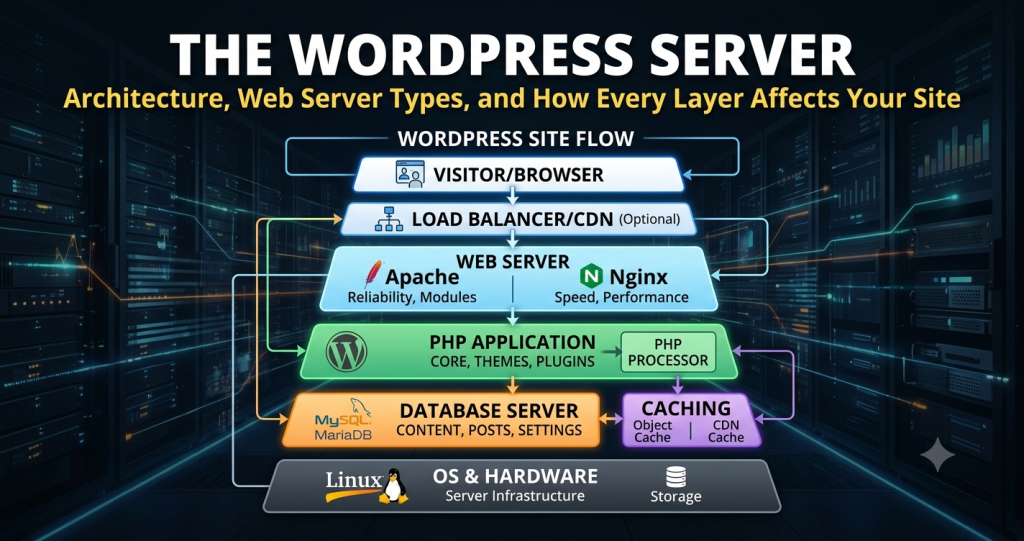
The WordPress Server: Architecture, Web Server Types, and How Every Layer Affects Your Site
A complete technical reference for server admins and developers — covering web server software, caching architecture, infrastructure providers, TTFB, and how the full server stack determines what your WordPress site can and cannot do.
Find the Right Hosting Stack →When a visitor loads a WordPress page, the request passes through a chain of software components before a single byte of HTML reaches their browser. The web server receives the connection, hands it to a PHP interpreter, which queries a database server, assembles the response, and returns it. Each step in that chain has configuration options, performance ceilings, and failure modes. The hosting environment wrapping it all — the cloud infrastructure, data centre location, caching layers, and server administration model — determines whether that chain runs in 80 milliseconds or 3 seconds.
This guide is written for server administrators, developers, and technically-minded site owners who want to understand the WordPress server stack at depth — not just which buttons to press, but why each architectural decision affects site performance, scalability, and security posture.
Section 1What a WordPress Server Actually Is
The term “WordPress server” is colloquially used to mean the machine hosting a WordPress installation — but it more precisely refers to the ensemble of software components that process and serve WordPress requests. A WordPress server is not a single piece of software; it is a layered stack, and understanding each layer is prerequisite to diagnosing performance problems and making informed hosting decisions.
Apache, NGINX, or LiteSpeed. Accepts incoming HTTP/HTTPS connections, routes requests, serves static files directly, and passes dynamic requests to the PHP layer.
Executes WordPress core, theme, and plugin PHP code. Runs as PHP-FPM (FastCGI Process Manager) in modern stacks. Version and worker pool configuration directly affect throughput.
MySQL or MariaDB. Stores all WordPress content, options, user data, and transients. Query efficiency and connection pool size are the main performance levers.
Full-page cache, object cache (Redis/Memcached), OPcache, and CDN edge cache. Collectively eliminate most PHP and database work for repeat requests.
The underlying hardware abstraction — bare metal, VPS, or cloud instance — that provides the CPU, RAM, and storage the software stack runs on.
WAF, DDoS mitigation, malware scanning, SSL/TLS termination. Operates at the edge or on the server itself, intercepting malicious traffic before it reaches PHP.
The Request Lifecycle: From Browser to Response
Understanding the full request path helps isolate where performance problems originate. A typical uncached WordPress page request flows as follows:
Each numbered step is a potential bottleneck. Steps 3–8 are where the hosting stack’s configuration determines whether the page loads in 80ms or 2 seconds. Steps 1–2 and 10 are where server location, data centre network quality, and CDN coverage determine latency for geographically distributed visitors.
Section 2Web Server Software: Apache, NGINX, and LiteSpeed Compared
The web server is the first software component to handle every incoming request. Its architecture determines how efficiently it manages concurrent connections, how it passes requests to PHP, and what native caching capabilities it exposes. For WordPress specifically, the choice of web server has measurable consequences for throughput under load, memory consumption per connection, and caching performance.
Apache HTTP Server
Apache is the oldest and most widely deployed web server in the world. Its dominance in shared hosting environments stems from its per-directory configuration model via .htaccess files — a feature WordPress depends on for clean permalink structures and plugin-level rewrite rules. This flexibility comes at a cost: Apache’s default prefork MPM (Multi-Processing Module) spawns a separate process per connection, each consuming independent memory. Under high concurrency, this process-per-request model is memory-intensive relative to event-driven alternatives.
Modern Apache deployments use the event MPM with PHP-FPM, which substantially improves concurrency handling — but even in this configuration, Apache carries overhead from its .htaccess file parsing on every request (unless AllowOverride None is set). For WordPress, where .htaccess is actively used, this per-request filesystem check adds latency that accumulates under load.
mod_php rather than PHP-FPM, each Apache worker process carries a full PHP interpreter in memory at all times — regardless of whether it is currently serving a PHP request. This architecture does not scale well for high-traffic WordPress sites.
NGINX
NGINX uses an asynchronous, event-driven architecture that handles thousands of concurrent connections within a small number of worker processes. Unlike Apache, NGINX does not support .htaccess — all configuration must be defined in server-block directives, typically managed by the hosting provider or server administrator. This is a strength in managed environments (configuration is centralised and predictable) but requires direct server access for customisation.
For WordPress, NGINX is typically deployed with PHP-FPM over a Unix socket for minimal inter-process communication overhead. Its FastCGI cache (fastcgi_cache) provides effective full-page caching at the web server level — storing rendered PHP output and serving subsequent requests for the same URL without invoking PHP at all. Properly configured NGINX FastCGI caching can reduce WordPress origin server load by 80–90% for content-heavy sites.
NGINX also excels as a reverse proxy in front of other web servers or application servers, making it a common choice in multi-tier WordPress architectures where it sits at the edge and proxies to PHP-FPM backends or upstream WordPress application servers.
LiteSpeed Web Server (LSWS)
LiteSpeed is a commercial web server designed as a drop-in replacement for Apache — it reads Apache configuration files and supports .htaccess natively, making it compatible with existing WordPress and cPanel setups without reconfiguration. Its event-driven architecture delivers NGINX-comparable concurrency performance with the operational familiarity of Apache.
For WordPress specifically, LiteSpeed’s most significant advantage is native integration with LiteSpeed Cache (LSCache) — a server-level full-page caching engine that operates below the PHP layer. LSCache stores cached pages in a dedicated server-side store, serves them at web server speed without PHP execution, and includes built-in support for cache vary rules (different cache versions for logged-in users, mobile visitors, etc.). The LiteSpeed Cache WordPress plugin communicates directly with the LSCache engine via a server API — this is architecturally distinct from PHP-level caching plugins like W3 Total Cache, which still execute PHP to serve cached content.
OpenLiteSpeed (OLS)
OpenLiteSpeed is the open-source edition of LiteSpeed Web Server. It retains the LSCache integration and event-driven architecture but omits the Apache .htaccess compatibility layer, reducing overhead further. OLS is increasingly common in developer-managed WordPress stacks as a high-performance alternative to NGINX — particularly on VPS and cloud instances where the administrator controls the full stack.
| Feature | Apache | NGINX | LiteSpeed (LSWS) | OpenLiteSpeed |
|---|---|---|---|---|
| Architecture | Process/event MPM | Event-driven async | Event-driven async | Event-driven async |
| .htaccess support | ✓ Native | ✗ None | ✓ Native | ✗ Limited |
| Native WP caching | ✗ | ~ FastCGI cache | ✓ LSCache | ✓ LSCache |
| Concurrency at scale | Moderate | Excellent | Excellent | Excellent |
| Memory per connection | High (prefork) | Low | Low | Low |
| cPanel / shared hosting | ✓ Standard | ~ Less common | ✓ Drop-in | ✗ Self-managed |
| HTTP/3 + QUIC | Via mod | ✓ | ✓ | ✓ |
| Licence | Open source | Open source | Commercial | Open source |
PHP Execution, the Database Layer, and Their Interaction
PHP-FPM Configuration for WordPress
PHP-FPM (FastCGI Process Manager) manages a pool of PHP worker processes that execute WordPress code. The two most important configuration parameters for WordPress performance are pm.max_children (the maximum number of concurrent PHP workers) and the process manager type (static, dynamic, or ondemand).
For a high-traffic WordPress site, pm = dynamic with a calibrated pm.max_children value is the standard configuration. The max_children ceiling is determined by available RAM: divide total available RAM by the average memory footprint of a single PHP-FPM worker (typically 30–60MB for a typical WordPress installation, though plugin-heavy sites can exceed 100MB per process). Exceeding this limit forces the OS to queue or reject new PHP requests — manifesting as 502 or 504 errors under load.
OPcache is the other critical PHP configuration lever. It compiles PHP source files into bytecode on first execution and stores the compiled output in shared memory — eliminating the parse-and-compile overhead on every subsequent request. For WordPress, which loads dozens of PHP files per request across core, plugins, and the active theme, OPcache provides a 20–40% throughput improvement with minimal configuration:
PHP version matters significantly. PHP 8.2 delivers 20–30% better performance than PHP 7.4 on equivalent WordPress workloads due to JIT compilation improvements and reduced internal overhead. Hosting providers that lock accounts to outdated PHP versions are giving away measurable performance for no benefit. Any production WordPress site should be running PHP 8.1 at minimum, with 8.2 or 8.3 preferred.
The MySQL/MariaDB Database Layer
WordPress’s database server is the most common performance bottleneck on uncached pages. Every WordPress page load typically fires between 10 and 50+ MySQL queries depending on the number of active plugins, widget areas, and custom post type meta lookups. On a site with heavy WooCommerce extensions or large post archives, query counts can exceed 100 per uncached request.
Key database configuration parameters for WordPress performance:
MariaDB is increasingly preferred over MySQL for WordPress deployments due to its Aria storage engine, more aggressive query optimiser, and better thread pool implementation under high concurrency. The innodb_buffer_pool_size setting is the single most impactful database configuration parameter — it controls how much of the database can be held in RAM, avoiding disk I/O for repeated reads. On a server dedicated to WordPress hosting, this should be set to approximately 70% of available RAM.
Server-Side Caching Architecture: The Full Stack
Caching is where WordPress server architecture diverges most sharply from other application types. A well-layered caching stack is the difference between a server that handles 500 concurrent users and one that collapses under 50. Each caching layer serves a distinct purpose and operates at a different point in the request lifecycle.
-
1Full-Page Cache
Stores the complete rendered HTML of a WordPress page after the first request and serves subsequent requests for the same URL directly from that stored copy — bypassing PHP execution and database queries entirely. Implemented at the web server level (LiteSpeed LSCache, NGINX FastCGI cache, Varnish) or just above it. This is the highest-impact single caching layer for WordPress.
Cache vary rules determine which requests receive cached responses: typically, logged-in users, cart pages, and query-string URLs bypass the full-page cache. Correct configuration of these exclusions is critical — over-caching breaks dynamic functionality; under-caching eliminates the performance benefit.
-
2Object Cache: Redis and Memcached
WordPress’s object cache stores the results of expensive database queries and computational operations in memory, making them available for subsequent requests within the same or future page loads. By default, WordPress’s object cache is non-persistent — it only survives within a single request. A persistent object cache backed by Redis or Memcached extends this across requests.
Redis is generally preferred for WordPress over Memcached: it supports data persistence (survives restarts), data structures beyond key-value pairs, and atomic operations — making it more suitable for WordPress transients, session storage, and WooCommerce session data. The
WP_CACHEconstant and a drop-inobject-cache.phpfile inwp-content/activate the persistent backend. -
3OPcache (PHP Bytecode Cache)
As described above, OPcache eliminates PHP parse-and-compile overhead for every request. It operates transparently below WordPress’s application layer. Its effect is cumulative with full-page caching: on a cache HIT, OPcache is largely irrelevant (PHP doesn’t run). On a cache MISS, OPcache significantly reduces the PHP execution time for the uncached request.
-
4CDN Edge Caching
A Content Delivery Network distributes static assets — images, CSS, JavaScript, fonts — to edge nodes geographically close to visitors. For a WordPress site, CDN integration typically operates at two levels: static asset delivery (always cacheable, high cache-hit rate) and edge-level full-page caching for HTML (more complex, requires careful cache invalidation logic).
Cloudflare, the most common CDN layer for WordPress, can cache full HTML pages at its edge nodes via Page Rules or Cache Rules — effectively moving the full-page cache from the origin server to the CDN edge, dramatically reducing origin load and improving response times globally. Cache invalidation on content publish requires either Cloudflare’s Cache Purge API or a WordPress plugin integration.
-
5Browser Cache
HTTP cache headers (
Cache-Control,Expires,ETag) instruct the visitor’s browser to store static assets locally and avoid re-fetching them on repeat visits. Configured at the web server level via headers directives. For WordPress, long cache lifetimes on versioned assets (CSS/JS with content-hash filenames) and short lifetimes on HTML pages is the standard approach.
TTFB, Server Performance, and What Drives It
Time to First Byte (TTFB) is the elapsed time between a browser sending an HTTP request and receiving the first byte of the response. Google’s Core Web Vitals framework uses TTFB as an input to Largest Contentful Paint (LCP) scoring — a slow TTFB delays the start of every subsequent page load operation and directly degrades LCP scores.
The components of TTFB are:
- Network latency: TCP connection establishment + TLS handshake. Determined by physical distance to server and network quality. Irreducible below the speed-of-light floor without moving the server closer to the visitor.
- Server processing time: Time from request receipt to response generation. Determined by caching effectiveness, PHP execution speed, database query performance, and web server configuration.
- Network transmission: Time to transmit the first byte of the response body back to the client. Usually negligible for small HTML responses.
On a well-configured WordPress server with full-page caching active, server processing time contributes under 10ms to TTFB — the remainder is network latency. On an uncached WordPress server under load, server processing time can exceed 1–3 seconds. This is why TTFB measurement must distinguish between cached and uncached response times: a site showing 80ms TTFB on a cached response and 2,000ms on an uncached response has a caching configuration problem, not a network problem.
Factors That Degrade TTFB at the Server Level
No or misconfigured full-page cache
The single largest avoidable TTFB contributor. Every uncached WordPress request runs the full PHP + database cycle, adding 200ms–2s of server processing time before a byte is sent.
Slow database queries
Unindexed tables, N+1 query patterns from poorly written plugins, large wp_options autoloaded rows, and insufficient buffer pool RAM all contribute to database-driven TTFB inflation.
PHP worker exhaustion
When all PHP-FPM workers are busy, new requests queue. TTFB spikes from the queue wait time, not from slow execution. Symptom: TTFB is fine at low concurrency but degrades sharply under load.
Disk I/O bottleneck
HDDs or SSD storage under heavy I/O degrades database read performance. NVMe SSDs reduce I/O wait times by an order of magnitude. Relevant when the database working set exceeds available RAM.
External HTTP calls during PHP execution
WordPress plugins that make synchronous external API calls (payment gateways, social APIs, tracking scripts) during PHP execution block the worker thread until the remote service responds — adding their latency directly to TTFB.
Server distance from visitor
Physics-imposed floor on TTFB. A server in New York adds ~80ms of irreducible latency for visitors in London. Server location and CDN edge coverage are the only solutions.
Server Location, Data Centres, and Network Latency
The physical location of a WordPress server’s data centre imposes a floor on network latency that no software optimisation can eliminate. Light travels through fibre optic cable at approximately 200,000 km/s — meaning a round trip between New York and London adds a minimum of ~35ms of network latency, before any server processing or TCP/TLS overhead. Real-world latency is typically 2–3× the theoretical minimum due to routing hops, congestion, and protocol overhead.
For a WordPress site with a geographically concentrated audience, the correct approach is to place the origin server in the same region as that audience. For a globally distributed audience, CDN edge caching handles static assets globally; edge-level full-page caching (via Cloudflare or similar) can extend this to HTML responses with appropriate cache TTLs.
Data Centre Quality Factors Beyond Location
Not all data centres are equal in quality within the same city. The factors that separate a Tier III/IV data centre from a budget colocation facility include:
| Factor | What it means for WordPress |
|---|---|
| Peering relationships | Direct interconnects with major ISPs and transit providers reduce routing hops, lowering latency and improving throughput to end users |
| Network redundancy | Multiple upstream providers prevent a single carrier failure from taking the server offline — directly supports the uptime SLA |
| DDoS scrubbing capacity | On-premise or upstream volumetric attack mitigation prevents network saturation from affecting legitimate traffic to the WordPress origin |
| Power infrastructure | N+1 or 2N UPS and generator redundancy determines whether hardware failures or power events cause downtime |
| IPv6 support | Native IPv6 delivery eliminates NAT overhead for IPv6-native visitors and is increasingly relevant for mobile traffic |
Match Your WordPress Stack to the Right Infrastructure
WP Host Finder surfaces hosting providers by server stack, data centre location, caching architecture, and infrastructure provider — not just price.
Find the Right Host for My Site →Infrastructure Providers: AWS, GCP, DigitalOcean, Linode, Vultr
The cloud infrastructure layer beneath the WordPress server determines the hardware quality, network capacity, geographic coverage, and scalability ceiling available to the stack above it. Most managed WordPress hosts and cloud-hosted WordPress deployments run on one of the following providers — understanding their characteristics helps evaluate hosting options more precisely.
The most extensive global footprint — 30+ regions, 96+ availability zones. EC2 instances power the majority of enterprise WordPress deployments. RDS for MySQL/MariaDB offloads database management. CloudFront provides tight CDN integration. The complexity and cost model makes direct AWS deployment impractical for most teams; accessed through managed WordPress hosts (WP Engine, Kinsta, Pagely) or via managed wrappers like AWS Lightsail. Highest network quality and regional coverage globally.
Google’s global fibre network delivers premium network throughput and latency, particularly for Asia-Pacific traffic. Cloud SQL for MySQL/MariaDB, Cloud CDN, and GCP’s load balancing infrastructure are used by managed WordPress hosts (Kinsta runs entirely on GCP). Compute instances (N2, C2) offer strong single-thread performance relevant for PHP workloads. Premium Tier networking routes traffic over Google’s backbone rather than public internet for significantly lower inter-region latency.
Predictable pricing, clean API, and strong developer tooling make DigitalOcean the most popular platform for self-managed WordPress VPS deployments. Droplets (virtual machines) provision in seconds; managed databases offload MySQL/MariaDB administration; Spaces object storage handles media offloading. Network performance is solid but not enterprise-grade for latency-sensitive workloads. 15 data centre regions. App Platform offers managed container hosting as an alternative to raw VPS.
Acquired by Akamai in 2022, Linode now benefits from Akamai’s global edge network for CDN integration. Competitive pricing on compute and NVMe storage. 11 core regions. Strong reputation for network consistency and support quality relative to price point. Managed databases available for PostgreSQL and MySQL. The Akamai integration differentiates Linode for WordPress deployments requiring deep CDN/edge optimisation alongside the compute layer.
32 data centre locations — broader geographic coverage than DigitalOcean or Linode at comparable price points. Bare metal instances available alongside standard cloud compute, relevant for WordPress deployments with intensive I/O workloads. High-frequency compute instances use Intel/AMD CPUs with higher clock speeds, benefiting PHP-FPM single-thread performance. Managed databases and block storage complete a full self-managed WordPress stack. Popular as the infrastructure layer beneath managed WordPress platforms.
Managed cloud hosting platforms that sit between raw infrastructure providers and fully managed WordPress hosts. Cloudways provisions and manages servers on DigitalOcean, Linode, Vultr, AWS, or GCP — providing a WordPress-optimised stack (NGINX/Apache, PHP-FPM, Redis, Varnish) with a management UI, without the full automation of dedicated managed WordPress hosts. Suitable for developers who want infrastructure choice without full server administration responsibility.
Choosing Infrastructure for WordPress: Key Considerations
For most WordPress sites, the choice of infrastructure provider is made indirectly — through the selection of a managed WordPress host that runs on a specific provider. The questions worth asking when evaluating a managed host’s infrastructure are: which provider do they run on, in which regions, and what their SLA covers in terms of the underlying infrastructure layer.
For developer-managed deployments on raw cloud infrastructure, the selection criteria are: data centre proximity to the target audience, compute instance type (favour higher single-thread clock speed for PHP-FPM workloads), managed database availability (to separate the database from the web server), object storage integration for WordPress media, and network egress costs (which vary significantly across providers and can become material for high-bandwidth sites).
Section 8Server Administration and the Managed vs. Unmanaged Decision
A WordPress server requires ongoing administration across its full lifecycle: initial configuration, security hardening, performance tuning, WordPress core and plugin updates, OS and software patch management, backup management, monitoring, and incident response. The question of who performs this work — the hosting provider or the site operator — is the fundamental distinction between managed and unmanaged hosting.
What Unmanaged Server Administration Requires
A developer or systems administrator running a self-managed WordPress server on a VPS or cloud instance needs competency across:
- Linux server administration — OS configuration, user management, process monitoring
- Web server installation and configuration — NGINX/Apache/LiteSpeed virtual hosts, SSL termination
- PHP-FPM pool configuration and tuning
- MySQL/MariaDB installation, configuration, and query optimisation
- Redis/Memcached deployment and WordPress integration
- SSL certificate provisioning and renewal (Let’s Encrypt via Certbot)
- Firewall configuration — iptables/nftables/UFW, fail2ban, WAF rules
- Backup automation — scheduled database dumps, file system snapshots, off-server transfer
- Security monitoring — log analysis, intrusion detection, malware scanning
- SSH hardening — key-based authentication, port configuration, fail2ban integration
- WP-CLI usage for WordPress operations — updates, database operations, search-replace
This is a substantial ongoing workload. For a site that generates revenue proportional to its uptime and performance, the engineering cost of self-managing the server stack is typically higher than the premium charged by a quality managed WordPress host — even before accounting for the cost of incidents that occur on inadequately administered servers.
Access Layers: SSH, FTP, cPanel, CLI
The access tools available on a WordPress server reflect its management model. On a self-managed server, SSH with key-based authentication provides full root or sudo access to the server — the starting point for all configuration. SFTP (SSH File Transfer Protocol, not plain FTP) provides secure file transfer without exposing credentials in transit; plain FTP should not be used on any production server.
cPanel is a web-based server management panel common on shared and managed hosting, providing a GUI for domain management, email, database administration, file management, and SSL certificate installation. On a self-managed VPS, cPanel/WHM is an optional paid addition. Alternatives include Plesk, DirectAdmin, and open-source options like CyberPanel (optimised for OpenLiteSpeed).
WP-CLI is the command-line interface for WordPress, enabling bulk operations that would be impractical through the WordPress admin UI: mass plugin updates across multisite networks, database search-replace for domain migrations, cache flushing, user management, and direct database queries. For server administrators managing WordPress at scale, WP-CLI proficiency is essential.
PermitRootLogin no), enforce key-based authentication (PasswordAuthentication no), configure a firewall allowing only ports 22/80/443, install fail2ban to block brute-force attempts, enable automatic OS security patches, and set up automated off-server backups with at minimum 14-day retention. These are not optional hardening steps — they are the minimum viable security posture for a public-facing web server.
WordPress Server — Technical Questions
What is the difference between a web server and a WordPress server?
A web server (Apache, NGINX, LiteSpeed) is the software component that accepts HTTP connections and routes requests. It handles static file delivery directly and passes dynamic requests to the PHP interpreter. A “WordPress server” refers to the full stack: web server + PHP-FPM + MySQL/MariaDB + caching layers, running on underlying hardware provided by a virtualisation or cloud infrastructure layer. When someone says their site “runs on LiteSpeed,” they mean the web server component — the PHP, database, and caching layers are separate configuration decisions.
Does LiteSpeed actually perform better than NGINX for WordPress?
For WordPress specifically, LiteSpeed has a meaningful advantage due to LSCache — its native full-page caching engine integrates at the web server level and communicates directly with the WordPress plugin, enabling more granular cache vary rules (mobile/desktop, logged-in status, cookie-based) without PHP overhead. In benchmarks comparing equivalent configurations, the performance difference between LiteSpeed and NGINX is modest when both are properly configured with full-page caching. The practical advantage of LiteSpeed is ease of caching configuration and the .htaccess compatibility for hosts migrating from Apache. A well-tuned NGINX stack with FastCGI cache delivers comparable throughput to LiteSpeed LSCache.
How do I determine the correct PHP-FPM max_children value for my server?
The formula: max_children = available_RAM ÷ average_PHP_worker_memory. To find your average PHP worker memory, run: ps --no-headers -o "rss,cmd" -C php-fpm | awk '{ sum+=$1 } END { print int(sum/NR/1024)"MB" }'. Reserve 20–30% of RAM for the OS, web server, and MySQL buffer pool before dividing. For example: 4GB server with 1.5GB reserved = 2.5GB for PHP; average worker = 60MB; max_children = ~41. Set pm.max_spare_servers to 25–50% of max_children to keep warm workers available without over-allocating idle memory.
Redis or Memcached for WordPress object caching — which should I use?
Redis is the correct choice for most WordPress deployments. It supports data persistence (the cache survives a Redis restart, preventing a thundering herd on restart), atomic operations (important for cache invalidation correctness), and richer data structures. For WooCommerce in particular, Redis handles session storage more reliably than Memcached. Memcached has slightly lower per-operation overhead and simpler horizontal scaling — it remains appropriate for pure read-heavy caching workloads where persistence is not needed, but for WordPress the operational advantages of Redis outweigh Memcached’s marginal performance edge.
How does server location affect my WordPress site’s SEO?
Server location affects SEO through its impact on TTFB and Core Web Vitals scores. A server physically distant from the majority of your visitors increases the network latency component of TTFB, which Google measures as part of LCP scoring. A site ranking for competitive keywords with a 1.8s LCP is at a disadvantage against an equivalent competitor with a 0.9s LCP — and server location is a contributing factor to that gap. For sites with a regional audience, colocating the origin server in that region is the most straightforward TTFB improvement. For global audiences, CDN edge delivery of cached content effectively eliminates origin server location as a latency variable for cache-hit requests.
What is edge caching and how does it differ from server-side caching?
Server-side caching stores cached responses on the origin server — the request still travels to the origin before being served from cache. Edge caching stores cached responses on CDN nodes distributed globally — the request is answered by the nearest edge node without reaching the origin at all. Edge caching delivers lower TTFB for geographically distributed visitors (response comes from a node potentially hundreds of milliseconds closer) and reduces origin server load (requests never reach the origin on cache hits). The trade-off is cache invalidation complexity: when content is updated, cached copies must be purged from all edge nodes, not just the origin server’s cache store. For predominantly static content (blog posts, landing pages), edge caching is highly effective. For dynamic, personalised content (logged-in users, cart pages), edge caching requires careful exclusion rules.
Which cloud infrastructure provider is best for a self-managed WordPress VPS?
For most self-managed WordPress deployments, DigitalOcean or Vultr offer the best combination of price, simplicity, and network quality. DigitalOcean’s documentation and community resources for WordPress/LEMP stack configuration are extensive. Vultr’s broader data centre footprint (32 locations) is advantageous for audience-proximate server placement. Linode/Akamai is competitive on price and adds CDN integration via Akamai’s edge network. AWS and GCP provide superior network performance and regional coverage but carry significantly higher operational complexity and cost — they are appropriate for high-traffic deployments or when enterprise SLA guarantees are required. For most sites under 500,000 monthly visitors, the performance difference between providers is smaller than the performance difference between good and poor server configuration on the same provider.
How does a WordPress multisite affect server architecture requirements?
A WordPress multisite network shares a single WordPress installation, database, and file system across multiple sites. At the server level, this concentrates load — a traffic spike on any site in the network affects the shared PHP pool and database connection pool. Caching configuration becomes more complex: full-page cache must be keyed by domain or subdirectory, and cache invalidation on one site must not flush caches for unrelated sites. Object cache namespacing (using blog ID as a key prefix) is essential to prevent cross-site cache contamination. On the database layer, multisite uses shared wp_users and wp_usermeta tables with per-site prefixed tables — the innodb_buffer_pool_size should be scaled accordingly. Self-managed multisite deployments should operate on dedicated resources, not shared hosting.
