

WordPress Infrastructure: AWS, Google Cloud, DigitalOcean, Linode, Vultr — and How the Cloud Layer Determines What Your Site Can Do
A technical reference for web developers and database managers — covering what cloud infrastructure actually is at the hardware and network level, how each major provider’s architecture differs, and how every infrastructure decision propagates up through the stack to affect WordPress compute, storage I/O, network latency, scalability ceiling, and site reliability.
Every WordPress site runs on hardware. The web server, PHP-FPM process pool, MySQL or MariaDB database, Redis object cache, and every other stack component are software processes executing on physical CPUs, reading and writing to physical storage, and communicating over physical network links. The cloud infrastructure layer is the virtualisation, orchestration, and network abstraction that sits between that physical hardware and the operating system on which your WordPress stack runs.
For most developers and database managers, the infrastructure layer is invisible day-to-day — you interact with your server via SSH, cPanel, or a provider’s control panel, and the hardware underneath is abstracted away. But infrastructure decisions are not neutral. The provider you (or your hosting vendor) chose determines the CPU architecture and clock speed your PHP-FPM workers execute on, the I/O throughput available to your MySQL buffer pool on cache misses, the network bandwidth ceiling, the latency floor between your server’s data centre and your audience, and the redundancy model behind your host’s uptime SLA. These are not marketing differences — they are engineering constraints that propagate directly into measurable WordPress site performance.
Section 1
What WordPress Infrastructure Actually Is — Below the OS Layer
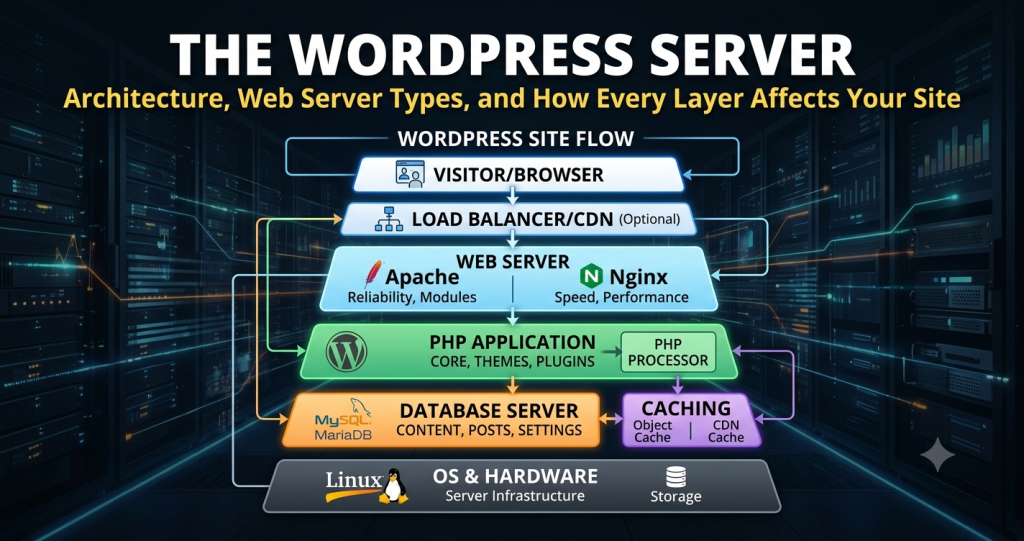
The term “infrastructure” in the context of WordPress hosting refers to the compute, storage, and network resources that underpin the server environment — everything below the operating system. A useful mental model is the stack hierarchy:
WordPress, plugins, themes, WP core files. PHP code executing queries and assembling HTML responses.
Web server (NGINX/LiteSpeed/Apache), PHP-FPM, MySQL/MariaDB, Redis/Memcached. Configured on top of the OS.
Linux (typically Ubuntu, Debian, or AlmaLinux). The kernel, filesystem, network stack, and process scheduler that the software stack runs on.
The virtualisation hypervisor, physical CPU/RAM/storage, and provider network. This is what AWS, GCP, DigitalOcean, Linode, and Vultr actually sell and what this guide covers.
When a cloud provider provisions a virtual server (a VM, Droplet, Linode, or instance), the hypervisor allocates a portion of a physical host’s CPU cores, RAM, and storage to that VM. The VM’s operating system sees virtualised hardware — virtual CPUs (vCPUs) that map to physical cores or threads, virtual NIC interfaces connected to the provider’s software-defined network, and virtual block devices backed by physical storage arrays.
The characteristics of the physical hardware underneath that virtualisation — CPU microarchitecture, core clock speed, RAM generation and speed, storage media type, and network switch capacity — directly determine the performance ceiling of the WordPress stack above it. A VM with 4 vCPUs on a modern AMD EPYC host processor executes PHP bytecode faster than a nominally identical VM on an older Intel Xeon host, even with identical OS and stack configuration. These differences are real and measurable, but rarely disclosed explicitly in provider marketing.
The Hypervisor and Its Impact on WordPress
The hypervisor is the software layer that creates and manages virtual machines on physical hosts. All major cloud providers use KVM (Kernel-based Virtual Machine) as their underlying hypervisor, with provider-specific orchestration layers above it. AWS uses the Nitro System — a custom hypervisor built on KVM with most hypervisor functions offloaded to dedicated hardware (a Nitro Card), reducing overhead and giving EC2 instances near-bare-metal performance characteristics for I/O and networking. GCP uses a KVM-based hypervisor with custom networking via Andromeda SDN. DigitalOcean, Linode, and Vultr all use standard KVM with their own orchestration layers.
The practical consequence for WordPress is CPU steal time. On virtualised infrastructure, multiple VMs share physical CPU cores. If a physical host is overprovisioned — too many VMs competing for available CPU cycles — individual VMs experience CPU steal: cycles they request but cannot be granted because the hypervisor has allocated them elsewhere. Persistent steal above 5–10% causes PHP-FPM workers to take longer to execute WordPress page builds, directly degrading TTFB on uncached requests and reducing the effective concurrency of the PHP worker pool.
# Monitor CPU steal time on your WordPress server
# %st column in top — anything sustained above 5% is a red flag
top -b -n 5 | grep "Cpu(s)"

# vmstat: 'st' column shows steal time per second
vmstat 1 10

# More granular: per-CPU steal with mpstat
apt install sysstat
mpstat -P ALL 1 5

# If steal is consistently high, options are:
# 1. Resize to a dedicated/CPU-optimised instance type
# 2. Migrate to a less-overloaded provider or region
# 3. Use bare metal if workload justifies it
Section 2
How Infrastructure Decisions Propagate Into WordPress Performance
Infrastructure characteristics are not abstract — each maps directly to a specific WordPress performance dimension. The following are the primary vectors through which the infrastructure layer affects what visitors and developers experience.
-
1CPU clock speed → PHP-FPM execution time
PHP is largely single-threaded per request. Each PHP-FPM worker executes WordPress’s bootstrap, plugin loading, and template rendering sequentially on a single vCPU core. Higher per-core clock speed directly reduces the wall-clock time for that execution. High-frequency compute instances (Vultr High Frequency at 4.0GHz+, AWS C-series with 3.5–3.9GHz base) execute the same PHP code measurably faster than general-purpose instances at 2.4GHz, reducing TTFB on uncached page builds. CPU selection matters most for plugin-heavy sites with long PHP execution chains.
-
2RAM allocation → InnoDB buffer pool + PHP worker headroom
Available RAM on the server determines two things simultaneously: the InnoDB buffer pool size (how much of the WordPress database can be held in memory, avoiding disk reads) and the number of PHP-FPM workers that can run in parallel (each consuming 30–100MB). A 2GB server forces a difficult tradeoff between database memory and PHP concurrency. 4GB is the practical minimum for a production WordPress server with a persistent object cache. 8GB+ allows meaningful separation of the buffer pool and PHP worker pool without contention.
-
3Storage I/O → database read/write latency
When a MySQL query requests data not resident in the InnoDB buffer pool, it must read from disk. The storage medium determines how fast that read completes: NVMe SSDs deliver random read latency of 50–100μs; SATA SSDs 100–500μs; HDDs 5–10ms. For a WordPress database with a working set larger than the buffer pool, NVMe storage can reduce individual query latency by 10–100× compared to SATA or spinning disk. All major cloud providers now offer NVMe-backed block storage or NVMe instance storage — verify your instance type’s storage specification, as legacy instance types on some providers still use SATA SSDs.
-
4Network latency → TTFB floor for all visitors
The round-trip network time between visitor and server is physics-constrained and irreducible without moving the server or using edge caching. The provider’s data centre locations determine which regions are available for your origin server. AWS with 30+ regions offers the finest-grained geographic placement globally. DigitalOcean with 15 regions covers primary markets well. Vultr’s 32 locations include markets like South Korea, São Paulo, Delhi, and Sydney that some competitors lack. For sites with non-Western audiences, server location choice within a provider is often as impactful as the provider choice itself.
-
5Network bandwidth → throughput ceiling for media-heavy sites
Bandwidth caps and egress pricing vary significantly across providers and have direct cost implications for WordPress sites serving large media files, downloadable content, or high video traffic without CDN offloading. AWS and GCP charge significant per-GB egress fees above the free tier. DigitalOcean, Linode, and Vultr provide generous bundled transfer allowances (2–10TB/month on most instance sizes) before additional charges apply — a meaningful cost difference for bandwidth-intensive WordPress deployments.
-
6Redundancy architecture → uptime SLA ceiling
The physical infrastructure model — single availability zone vs multi-AZ, single power feed vs N+1 redundancy, single upstream vs multi-homed network — sets the theoretical ceiling on the uptime SLA a host can credibly offer. A WordPress site on a single Droplet in a single DigitalOcean availability zone has no hardware redundancy — hardware failure takes the site offline until the provider restores or replaces the instance. Multi-AZ deployments (available on AWS, GCP, and via DigitalOcean/Linode managed database clusters) provide synchronous standby resources that fail over automatically on hardware failure.
Section 3
Compute Types: Shared VPS, Dedicated CPU, Bare Metal, and Containers
Within any cloud provider, compute instances are offered in multiple tiers that determine the isolation and consistency of CPU resources. Understanding the distinction is critical for diagnosing performance variability and sizing WordPress infrastructure correctly.
| Type | CPU model | Noisy neighbour risk | WordPress use case | Typical cost |
|---|---|---|---|---|
| Shared VPS / General Purpose | vCPUs share physical cores with other VMs | Moderate — depends on host utilisation | Development, low-traffic blogs, personal sites, staging | Lowest ($4–$20/mo) |
| CPU-Optimised / Dedicated CPU | Dedicated physical CPU cores, not shared | None — dedicated cores | Business sites, WooCommerce, high-traffic WordPress | Medium ($40–$160/mo) |
| High-Frequency Compute | Dedicated cores + higher clock speed (3.8–4.2GHz) | None — dedicated + faster | PHP-intensive sites where execution time is the bottleneck; agency multi-site | Medium-High ($30–$120/mo) |
| Memory-Optimised | Higher RAM:vCPU ratio, dedicated cores | None | Large InnoDB buffer pools; sites with datasets that exceed general-purpose RAM | High ($80–$320/mo) |
| Bare Metal | Full physical host, no hypervisor | None — fully isolated | 1M+ visitor sites; I/O-intensive WooCommerce; dedicated hosting platforms | Very High ($200–$800+/mo) |
| Containers (ECS, Cloud Run, App Platform) | Shared kernel, isolated process space | Managed by provider | Stateless WordPress microservices; CI/CD deployments; not standard WP hosting | Variable (pay-per-use) |
top → %st). Inconsistent steal indicates a shared-CPU instance on an overprovisioned host. Upgrading to a dedicated CPU or CPU-optimised instance type on the same provider typically resolves this before any stack-level tuning.
Section 4
Storage Architecture: NVMe, Block Storage, and Object Storage
Storage in cloud infrastructure comes in three forms, each serving a different role in a WordPress deployment. Understanding which storage type backs which component of your stack determines your database I/O performance, your media delivery architecture, and your backup strategy.
Storage physically attached to the host machine running the VM. Lowest possible latency (50–200μs) and highest IOPS. Used for the OS, PHP-FPM, the WordPress stack, and the MySQL data directory on single-server setups. Not redundant — data is lost on instance termination or hardware failure. Best for ephemeral workloads or configurations with external DB backups.
Persistent SSD volumes attached over the provider’s internal network. Survives instance termination; can be detached and reattached to new instances. Slightly higher latency than local NVMe (200–500μs typical) but redundant and persistent. The standard storage tier for production WordPress database volumes. AWS EBS io2 Block Express delivers enterprise-grade IOPS guarantees.
HTTP-accessible blob storage for unstructured data. Not mountable as a filesystem; accessed via API or SDK. Used to offload WordPress media (wp-content/uploads/) from the server filesystem, enabling stateless WordPress instances and CDN distribution. Dramatically reduces server I/O for media-heavy sites and enables horizontal scaling. Native CDN integration on most providers.
WordPress Media Offload and Object Storage
WordPress stores uploaded media files on the local server filesystem by default — typically /var/www/html/wp-content/uploads/. On a single-server stack, every request for an image or document is served directly from local disk by the web server. This creates I/O contention with MySQL disk reads and PHP-FPM execution on the same storage subsystem, and it makes the WordPress instance stateful — you cannot add a second web server without synchronising the uploads/ directory between instances.
Offloading media to object storage (AWS S3, DigitalOcean Spaces, GCP Cloud Storage, Linode Object Storage, Vultr Object Storage) via a plugin such as WP Offload Media removes media files from the server entirely. The plugin rewrites WordPress attachment URLs to point to the object storage endpoint or a CDN distribution in front of it. The result is: zero server I/O for media delivery, stateless WordPress instances that can be horizontally scaled, and CDN-native delivery of all uploaded media with sub-100ms latency globally via the provider’s edge network.
# Example: configure WP Offload Media for DigitalOcean Spaces
# wp-config.php additions

define( 'AS3CF_SETTINGS', serialize( array(
    'provider'              => 'do',           // 'aws' | 'gcp' | 'do'
    'access-key-id'         => 'YOUR_KEY',
    'secret-access-key'     => 'YOUR_SECRET',
    'bucket'                => 'my-wp-media',
    'region'                => 'nyc3',
    'copy-to-s3'           => true,
    'serve-from-s3'        => true,
    'remove-local-file'    => true,   // Remove from server after upload
    'enable-object-prefix' => true,
    'object-prefix'        => 'wp-content/uploads/',
    'use-presigned-urls'   => false,
) ) );

# Spaces CDN endpoint (auto-enabled when CDN is toggled in DO console)
# Rewrites media URLs to: https://my-wp-media.nyc3.cdn.digitaloceanspaces.com/...
Section 5
Network Architecture: Bandwidth, Peering, Private Networking, and VPCs
The network layer of cloud infrastructure determines three things for WordPress: the latency between the server and visitors, the throughput ceiling for content delivery, and the security isolation between stack components. Each provider implements these differently, and the differences have direct operational consequences.
Egress Bandwidth and Transfer Pricing
Every byte of HTML, CSS, JavaScript, or media that WordPress serves to visitors travels outbound across the provider’s network — this is egress bandwidth. Providers charge for egress differently, and the pricing model significantly affects the total cost of operating a high-traffic WordPress site without aggressive CDN offloading.
| Provider | Bundled transfer | Overage rate | Cost model impact |
|---|---|---|---|
| AWS | 100GB/mo free tier; minimal on paid instances | $0.08–$0.09/GB (US); higher in other regions | Very high for bandwidth-intensive sites. CloudFront egress is discounted but still charged. Must factor into TCO. |
| GCP | 1GB/mo to internet free; minimal otherwise | $0.08–$0.12/GB depending on region | High. Premium Tier networking costs more but routes over Google’s backbone rather than public internet. |
| DigitalOcean | 1–6TB/mo bundled depending on instance size | $0.01/GB over limit | Low. Bundled transfer is generous for most WordPress sites. Cost-predictable. |
| Linode / Akamai | 1–20TB/mo bundled | $0.005/GB over limit | Very low. Most generous bundled transfer per dollar. Ideal for media-heavy or high-traffic WordPress without full CDN offload. |
| Vultr | 1–6TB/mo bundled | $0.01/GB over limit | Low. Comparable to DigitalOcean. Broader region coverage for same cost. |
Private Networking and VPCs
A Virtual Private Cloud (VPC) is an isolated private network within the provider’s infrastructure. Traffic between resources inside the same VPC stays on the provider’s internal network — it never traverses the public internet, is not subject to egress charges (on most providers), and is not exposed to external attack surfaces. For WordPress, the critical security use case is database isolation: the MySQL/MariaDB server should be on a private network only, with port 3306 unreachable from any public IP.
# MySQL/MariaDB: bind to private IP only (/etc/mysql/my.cnf)
# Replace 10.0.0.5 with your server's private/VPC IP address
bind-address = 10.0.0.5

# WordPress wp-config.php: connect via private IP
define( 'DB_HOST', '10.0.0.5' );  // Private VPC IP of your DB server

# UFW firewall: allow MySQL only from web server's private IP
ufw allow from 10.0.0.4 to any port 3306  // Web server private IP only
ufw deny 3306                              // Block all other MySQL access

# Verify no public exposure
ss -tlnp | grep 3306
# Should show: 10.0.0.5:3306 — NOT 0.0.0.0:33060.0.0.0:3306 and reachable on a public IP is exposed to internet-wide brute-force and credential-stuffing attacks. This configuration is the cause of a significant proportion of WordPress database compromises. Always bind MySQL to the private network interface only. All major providers offer free VPC/private networking — there is no operational or cost reason to run MySQL on a public IP.
Section 6
Amazon Web Services (AWS) — Technical Deep Dive
AWS is the largest cloud infrastructure provider globally by market share and regional footprint. For WordPress, AWS is primarily accessed indirectly — through managed WordPress hosts (WP Engine, Kinsta on GCP, Pagely) or through Lightsail, AWS’s simplified VPS product designed to abstract EC2 complexity. Direct EC2 deployments for WordPress exist at enterprise scale but carry significant operational complexity and require competent Linux server administration across IAM, VPC, security groups, load balancing, and autoscaling.
Nitro System: AWS’s custom hypervisor offloads network and storage virtualisation to dedicated hardware (Nitro Cards), giving EC2 instances near-bare-metal I/O performance. On Nitro-based instances (C5, M5, R5, and newer), EBS I/O does not compete with the vCPU for compute resources — network packets and storage operations are processed by the Nitro Card. This architecture is particularly relevant for WordPress sites where the web server and database co-exist on a single EC2 instance, as MySQL disk reads don’t steal CPU cycles from PHP-FPM workers.
EC2 instance families for WordPress: The C-series (Compute Optimised: C6i, C7g) delivers the highest per-core performance for PHP execution workloads. M-series (General Purpose: M6i, M7g) balances CPU and RAM for single-server WordPress stacks. R-series (Memory Optimised: R6i) is appropriate for database-heavy deployments where a large InnoDB buffer pool is the priority. Graviton-based instances (C7g, M7g, R7g) use AWS’s ARM-based processor and deliver 20–40% better price-performance than equivalent x86 instances for most web workloads.
RDS for MySQL/MariaDB: Amazon RDS fully manages the database layer, handling provisioning, patching, automated daily backups, point-in-time restore, and Multi-AZ failover. RDS Multi-AZ maintains a synchronous standby replica in a second Availability Zone; on primary failure, DNS failover routes the WordPress DB_HOST connection to the standby automatically, typically within 60–120 seconds. RDS Aurora MySQL is a MySQL-compatible engine re-architected with distributed storage — it maintains six copies of data across three AZs and can recover from most failure modes without failover latency.
ElastiCache for Redis: AWS’s managed Redis service provides the persistent object cache layer for WordPress. For production WordPress on AWS, ElastiCache (or the newer ElastiCache Serverless) replaces self-managed Redis, handling cluster management, patch updates, and Multi-AZ replication for the cache layer.
Section 7
Google Cloud Platform (GCP) — Technical Deep Dive
GCP is the infrastructure layer beneath Kinsta — one of the most technically respected managed WordPress platforms — and its network architecture is genuinely differentiated at the infrastructure level. Google built its own global fibre network (the same backbone that routes Gmail, Google Search, and YouTube) and routes cloud traffic over it with a choice of two tiers.
Premium vs Standard networking: GCP’s Premium Tier routes traffic between the user’s browser and the GCP data centre over Google’s private global backbone from the nearest Google point-of-presence — traffic enters Google’s network immediately and stays there. Standard Tier uses the public internet for most of the transit path. For WordPress, Premium Tier networking delivers measurably lower latency and fewer routing hops for globally distributed visitors, at a small cost premium. This is the network model Kinsta uses and contributes to its consistently strong TTFB benchmarks across global test locations.
Compute Engine instance types: The N2 (Intel Ice Lake) and N2D (AMD EPYC) series provide the best general-purpose price-performance for WordPress workloads. C3 (Intel Sapphire Rapids) and C3D (AMD Genoa) are compute-optimised for PHP-intensive workloads. E2 instances use a shared-core model at low cost — appropriate for development and staging but not for production WordPress under sustained load. GCP’s T2A instances use ARM (Ampere Altra) and deliver strong PHP throughput at competitive per-core pricing.
Cloud SQL for MySQL: GCP’s managed MySQL service provides the database layer for Kinsta and GCP-hosted WordPress deployments. High-availability configuration deploys a synchronous standby in a different zone with automatic failover. Cloud SQL supports MySQL 8.0 and PostgreSQL. Point-in-time recovery retains binary logs alongside automated backups, enabling restoration to any second within the retention window — important for daily backup and compliance requirements.
Memorystore for Redis: GCP’s managed Redis service provides the object cache layer. Standard tier provides replication and automatic failover. Memorystore is pre-configured in production Kinsta environments as the persistent object cache backend for all hosted WordPress sites.
Section 8
DigitalOcean — Technical Deep Dive
DigitalOcean is the most widely used cloud provider for self-managed WordPress VPS deployments. Its developer-first philosophy produces clean APIs, clear pricing, excellent documentation, and a Marketplace of one-click application stacks — including LEMP (Linux, NGINX, MySQL, PHP) and WordPress pre-configured images. The practical barrier to deploying a production-grade WordPress server on DigitalOcean is lower than on AWS or GCP by a significant margin.
Droplet compute tiers: Basic Droplets use shared vCPUs and are the entry-level tier — appropriate for development and low-traffic sites, but subject to CPU steal under sustained load. General Purpose and CPU-Optimised Droplets use dedicated vCPUs isolated from other tenants’ workloads. For production WordPress — particularly WooCommerce, agency multi-site, or any site where consistent TTFB under load matters — CPU-Optimised ($40/mo for 2 dedicated vCPUs + 4GB RAM) is the appropriate entry point. Premium AMD and Premium Intel Droplets in both tiers use newer generation processors with higher base clock speeds (AMD EPYC 7003 series, Intel Ice Lake) that deliver better PHP-FPM execution times.
Managed Databases: DigitalOcean’s Managed Database service for MySQL 8 provides automated daily backups, point-in-time restore, standby nodes with automatic failover, connection pooling via PgBouncer (for PostgreSQL) and a built-in connection limit governor for MySQL, and automated minor version patching. The database runs on its own dedicated Droplet infrastructure with NVMe storage, removing I/O contention between the database and the web server. The database connection from the WordPress server to the managed database cluster routes over DigitalOcean’s private network (VPC), keeping round-trip latency under 1ms within the same region.
Spaces object storage: DigitalOcean Spaces is an S3-compatible object storage service with a native CDN edge network. It accepts the same API calls as AWS S3 and is directly compatible with WP Offload Media’s DigitalOcean Spaces integration. The Spaces CDN is automatically available — enabling cdn.digitaloceanspaces.com delivery for WordPress media globally from DigitalOcean’s CDN edge nodes. Pricing is flat: $5/month for 250GB storage + 1TB transfer, with additional transfer at $0.01/GB.
App Platform: DigitalOcean’s Platform-as-a-Service offering supports containerised WordPress deployments — providing managed scaling, zero-downtime deploys, and integrated managed databases. It abstracts server configuration at the cost of reduced low-level control. Appropriate for teams who want managed infrastructure without operating raw VPS instances, but requires WordPress to be stateless (media on Spaces, sessions externalised).
Section 9
Linode / Akamai Cloud — Technical Deep Dive
Linode was acquired by Akamai Technologies in 2022 — a pairing that significantly changes Linode’s infrastructure positioning. Akamai operates the world’s largest content delivery network with over 4,000 edge PoPs across 130+ countries. The integration with Linode’s compute layer means WordPress deployments on Linode can now leverage Akamai’s CDN directly, combining a competitively priced VPS/cloud layer with enterprise-grade edge delivery — a combination previously only available by separately subscribing to Cloudflare Enterprise or Akamai’s own commercial CDN.
Compute performance: Linode’s standard shared instances (Nanode through Linode 16GB) provide solid baseline performance with AMD EPYC and Intel processors. Dedicated CPU Linodes provide isolated cores for production WordPress workloads. High Memory instances offer a 24:1 RAM:vCPU ratio — appropriate for database-heavy configurations where a large InnoDB buffer pool is the primary requirement. Linode’s compute pricing is competitive with DigitalOcean at equivalent specifications.
Akamai CDN integration: The Akamai CDN layer accessible via Linode’s control panel can act as a full reverse proxy in front of WordPress — caching HTML responses at the edge, not just static assets. Akamai’s edge network has significantly higher geographic coverage than provider-native CDNs (DigitalOcean Spaces CDN, Vultr CDN) with PoPs in markets across Africa, South Asia, and Southeast Asia where competitor CDN coverage is thinner. For high-traffic WordPress sites with global audiences, this is the most material differentiator Linode/Akamai offers over comparably priced competitors.
Managed Databases: Linode Managed Databases supports MySQL (8.0) and PostgreSQL in cluster configurations — three-node clusters with automatic failover and continuous backups. Connection string compatibility with WordPress is direct: the managed DB endpoint replaces the DB_HOST in wp-config.php with no application changes required. Standby nodes in a managed cluster participate in read operations (for read replica offloading) or remain hot-standby for failover.
Object Storage: Linode Object Storage is S3-compatible and compatible with WP Offload Media. Available in multiple regions. Generous free egress via the Akamai CDN integration when traffic routes through Akamai’s edge — relevant for media-heavy WordPress with globally distributed visitors.
Section 10
Vultr — Technical Deep Dive
Vultr’s primary differentiation is geographic reach: 32 data centre locations covering markets that DigitalOcean and Linode do not serve — including São Paulo, Mexico City, Delhi, Seoul, Osaka, Melbourne, and Johannesburg. For WordPress sites targeting audiences in these markets, Vultr enables origin server placement in audience-proximate regions not available on comparable-price competitors, reducing TTFB through latency reduction without requiring full CDN edge HTML caching.
High Frequency Compute: Vultr’s High Frequency instances use Intel Ice Lake processors at 3.7GHz+ base clock (boosting to 4.0–4.2GHz), paired with NVMe local storage. For WordPress, this instance type delivers among the fastest single-threaded PHP-FPM execution times available at the $6–$24/month price tier. A High Frequency 2 vCPU / 4GB RAM instance at $24/month is a strong choice for production business WordPress sites where uncached PHP execution speed is a bottleneck and budget constrains moving to larger dedicated CPU instances on other providers.
Bare Metal: Vultr offers single-tenant bare metal servers in most of its 32 locations — among the broadest geographic bare metal availability of any provider at this price tier. WordPress deployments at very high traffic scale, or agencies hosting many high-traffic client sites on shared infrastructure, can leverage bare metal to eliminate hypervisor overhead and guarantee CPU isolation. Vultr’s bare metal provisioning is automated (ready in minutes rather than the hours typical of legacy dedicated server providers).
Optimised Cloud Compute: Vultr’s Optimised tier offers dedicated vCPUs in General Purpose, CPU Optimised, Memory Optimised, and Storage Optimised configurations — mirroring the AWS/GCP instance family model at competitive pricing. Storage Optimised instances pair dedicated CPUs with large NVMe SSD volumes — appropriate for WordPress database servers with large datasets that must fit within or near the buffer pool.
Managed Databases: Vultr’s Managed Database service supports MySQL and PostgreSQL with automated backups, read replicas, and connection pooling. Available in most Vultr regions — the geographic breadth is a practical advantage for teams deploying databases co-located with their compute in non-primary markets.
Section 11
Provider Comparison Matrix
| Factor | AWS | GCP | DigitalOcean | Linode / Akamai | Vultr |
|---|---|---|---|---|---|
| Region count | 33 | 40 | 15 | 25 | 32 |
| WordPress self-managed ease | Low | Low–Medium | High | High | High |
| Dedicated CPU instances | ✓ (C/M/R series) | ✓ (N2/C3 series) | ✓ (CPU-Optimised) | ✓ (Dedicated) | ✓ (Optimised) |
| High-freq compute | ✓ (C7i 3.5GHz+) | ✓ (C3 Sapphire Rapids) | ✓ (Premium Intel/AMD) | ~ (varies by region) | ✓ (4.0GHz+ Ice Lake) |
| NVMe storage default | ~ (instance storage optional) | ~ (local SSD optional) | ✓ (CPU-Opt Droplets) | ~ (Dedicated CPU) | ✓ (HF / Optimised) |
| Managed MySQL | ✓ RDS / Aurora | ✓ Cloud SQL | ✓ Managed Databases | ✓ Managed Databases | ✓ Managed Databases |
| Managed Redis | ✓ ElastiCache | ✓ Memorystore | ✓ Managed Redis | ~ (self-managed) | ✓ Managed Redis |
| Object storage | S3 | GCS | Spaces | Object Storage | Object Storage |
| CDN integration | CloudFront (460+ PoPs) | Cloud CDN / Media CDN | Spaces CDN | Akamai CDN (4,000+ PoPs) | Partner CDN |
| Bare metal | ✓ | ~ (via partners) | ✗ | ~ (limited regions) | ✓ 32 locations |
| VPC / private networking | ✓ | ✓ | ✓ | ✓ | ✓ |
| Egress cost | High | High | Low (bundled) | Very low (bundled) | Low (bundled) |
| Managed WP hosts on platform | WP Engine, Pagely, many others | Kinsta | Cloudways, Rocket.net | Cloudways (option) | Cloudways (option) |
Section 12
Choosing Infrastructure for Your WordPress Use Case
Infrastructure selection should be driven by audience geography, traffic profile, operational model, and budget — in that order. The table below maps common WordPress use cases to infrastructure recommendations based on the technical factors covered in this guide.
| Use case | Infrastructure recommendation | Key technical reason |
|---|---|---|
| Personal blog / personal site | DigitalOcean Basic or Vultr Cloud Compute ($6–$12/mo) | Shared vCPU is sufficient at low traffic volumes; cost-efficiency prioritised over isolation |
| Business website / agency site | DigitalOcean CPU-Optimised or Vultr High Frequency ($24–$48/mo) | Dedicated vCPUs eliminate steal-time variance; NVMe improves DB read consistency |
| WooCommerce store | Dedicated CPU server + Managed MySQL (DigitalOcean / Linode / Vultr) or managed WP host | High write concurrency needs isolation; managed DB provides automatic failover for order data durability |
| High-traffic WordPress | Managed WP host on GCP (Kinsta) or AWS (WP Engine), or self-managed on dedicated CPU + managed DB + Redis | Network quality, autoscaling, and managed Redis/DB are critical above ~500K monthly visitors |
| WordPress Multisite | Memory-optimised dedicated CPU instance (Linode High Memory or AWS R6i) | Shared DB pool under multisite load requires larger InnoDB buffer pool to avoid disk reads across all subsites |
| Global audience site | Linode/Akamai (Akamai CDN) or AWS (CloudFront) or Vultr with Cloudflare in front | Akamai CDN PoP density covers markets where other provider CDNs have limited reach |
| Non-Western audience (Africa, South Asia, SE Asia) | Vultr (São Paulo, Delhi, Seoul, Johannesburg) or Linode/Akamai edge | Origin proximity reduces latency floor; Akamai CDN covers emerging markets with highest PoP density |
| Developer / agency managing 10+ client sites | Cloudways (on DigitalOcean, Vultr, or Linode) or managed WP host | Managed layer abstracts per-server OS administration; provider choice still determines underlying compute and network quality |
Infrastructure Evaluation Checklist for Web Developers
When auditing an existing WordPress hosting environment or evaluating a new provider, work through these infrastructure-layer checks before tuning the application stack:
Run top or vmstat 1 30 on the server and record the %st value. Above 5% sustained = overprovisioned host. Upgrade to dedicated CPU or migrate.
Run lsblk -d -o NAME,ROTA — ROTA=0 means SSD/NVMe, ROTA=1 means HDD. Check fio benchmarks for IOPS if storage type is ambiguous.
Use mtr or Pingdom TMS from the audience’s primary location. TTFB minus server processing time = network latency. Above 150ms to primary audience suggests wrong region.
Run ss -tlnp | grep 3306. Result must show the private IP, not 0.0.0.0. Confirm firewall rule blocks 3306 from public internet.
Run SHOW STATUS LIKE 'Innodb_buffer_pool%' and calculate: (pool_read_requests - pool_reads) / pool_read_requests. Below 99% = RAM constraint or undersized buffer pool.
Single-instance WordPress has no hardware failover. Document the recovery procedure for hardware failure. Consider managed DB with standby node if downtime costs exceed the upgrade cost.
# Full infrastructure health check — run on your WordPress server

# 1. CPU steal time (watch for 30s)
vmstat 1 30 | awk '{print $16}' | tail -25 | awk '{sum+=$1} END {print "Avg CPU steal: " sum/NR "%"}'

# 2. Storage type and IOPS
lsblk -d -o NAME,ROTA,SIZE,MODEL
apt install fio -y
fio --name=randread --ioengine=libaio --iodepth=32 --rw=randread --bs=4k \
    --direct=1 --size=512M --numjobs=1 --runtime=30 --group_reporting \
    --filename=/tmp/fiotest

# 3. MySQL buffer pool hit ratio
mysql -u root -p -e "
  SELECT
    (1 - (variable_value / (SELECT variable_value FROM performance_schema.global_status
      WHERE variable_name = 'Innodb_buffer_pool_read_requests'))) * 100 AS hit_ratio_pct
  FROM performance_schema.global_status
  WHERE variable_name = 'Innodb_buffer_pool_reads';"

# 4. Network round-trip to primary audience city
mtr --report --report-cycles 20 8.8.8.8

# 5. MySQL binding check
ss -tlnp | grep 3306
Frequently Asked Questions
WordPress Infrastructure — Technical Questions
What does cloud infrastructure mean for a WordPress site?
Cloud infrastructure is the virtualised compute, memory, storage, and network fabric on which a WordPress server stack runs. It is the layer below the operating system — the physical or virtualised hardware that PHP-FPM, MySQL/MariaDB, NGINX, and every other WordPress stack component depend on.
The provider’s infrastructure determines CPU clock speed and core count, available RAM, storage I/O performance (NVMe vs SATA SSD), network bandwidth and latency, geographic region availability, and the redundancy model behind the uptime SLA.
Which cloud provider is best for WordPress hosting?
There is no single best provider — the right choice depends on traffic volume, audience geography, budget, and operational model. AWS and GCP offer the highest global coverage, network quality, and enterprise SLAs, but carry higher cost and operational complexity. DigitalOcean and Vultr are the most developer-friendly for self-managed WordPress VPS deployments, with predictable pricing and strong documentation. Linode/Akamai adds native Akamai CDN integration — the most material differentiator for globally distributed audiences.
For most sites under 500,000 monthly visitors, the performance difference between providers is smaller than the performance difference between good and poor server configuration on the same provider.
What is the difference between a VPS and cloud hosting for WordPress?
A VPS is a fixed-resource virtual machine allocated from a pool of physical hardware — you pay for a defined amount of CPU, RAM, and storage regardless of usage. Cloud hosting refers to compute instances that can be resized, autoscaled, or replaced programmatically via API. In practice, DigitalOcean Droplets, Linode Linodes, and Vultr Cloud Compute instances are all VPS products delivered via cloud infrastructure.
The distinction matters for WordPress when planning for traffic spikes: pure cloud autoscaling requires stateless WordPress architecture (media offloaded to object storage, session state externalised to Redis), while a standard VPS serves one fixed-size instance. See WordPress cloud hosting and WordPress VPS hosting for hosting-level comparison.
How does the choice of cloud region affect WordPress TTFB?
Network latency between the server and visitor is determined by physical distance and routing quality. Light travels through fibre at approximately 200,000 km/s, adding roughly 1ms of latency per 200km of fibre path. A WordPress origin server in US-East adds 70–90ms of irreducible round-trip latency for visitors in Western Europe, before any server processing time.
For sites with a geographically concentrated audience, placing the origin server in the nearest available region is the most direct TTFB improvement available at the infrastructure layer. For globally distributed audiences, CDN edge caching offloads static and cacheable content regardless of origin location — but the origin round-trip still matters for uncached requests and for cache revalidation.
What is a bare metal server and when does WordPress need one?
A bare metal server is a dedicated physical machine with no hypervisor layer — the operating system runs directly on the hardware, with no virtualisation overhead and no CPU or I/O contention from neighbouring tenants. For WordPress, bare metal is relevant only at very high traffic volumes (typically 1M+ monthly visitors) or for I/O-intensive workloads like WooCommerce with large product catalogues and heavy database write operations.
The operational overhead (no live migration, manual hardware failure handling) makes bare metal impractical for most teams. High-frequency compute VPS instances on Vultr or dedicated CPU instances on DigitalOcean are a practical middle ground delivering predictable CPU performance without bare metal’s operational complexity.
How does object storage (S3, Spaces, GCS) affect WordPress media performance?
WordPress stores uploaded media in wp-content/uploads/ on the local server filesystem by default. On a single-server stack this creates I/O contention between media file serving and PHP/database operations. Offloading media to object storage (AWS S3, DigitalOcean Spaces, GCP Cloud Storage) via a plugin removes media files from the server entirely, serving them from the object storage endpoint or a CDN distribution in front of it.
This reduces local disk I/O, makes the WordPress instance stateless (enabling horizontal scaling across multiple virtual servers), and typically improves media delivery latency for geographically distributed visitors when combined with CDN integration native to the object storage service.
What is a VPC and why does it matter for WordPress database security?
A Virtual Private Cloud (VPC) is an isolated private network within a cloud provider’s infrastructure, accessible only to resources you explicitly place inside it. For WordPress, the security-critical use case is database isolation: the MySQL/MariaDB server should never be reachable on a public IP. Placing the web server and database server inside the same VPC allows PHP-FPM to connect to the database over the private network (sub-1ms latency, no internet exposure) while the database port (3306) is unreachable from the public internet.
All major providers — AWS, GCP, DigitalOcean, Linode, and Vultr — provide VPC or private networking at no additional cost. Combined with WordPress security infrastructure at the application layer, private networking is the most impactful single database security control available at the infrastructure layer.
What is the noisy neighbour problem on cloud infrastructure and how does it affect WordPress?
On virtualised cloud infrastructure, multiple VMs share the same physical host. The noisy neighbour problem occurs when another tenant’s workload saturates shared resources — CPU steal time, memory bandwidth, storage I/O, or network throughput — degrading performance for all VMs on that host.
For WordPress, CPU steal time is the most observable symptom: it appears in top or vmstat as %st and represents cycles your instance requested but could not receive because the hypervisor allocated them to another VM. Persistent CPU steal above 5–10% indicates infrastructure overselling and warrants either resizing to a dedicated CPU instance (DigitalOcean CPU-Optimised, Vultr High Frequency) or migrating to a less saturated provider or region. Shared-vCPU basic instances on all providers are susceptible to this — dedicated CPU instances eliminate the risk entirely.
