

WordPress Security Infrastructure: DDoS, WAF, SSL, Malware Scanning, and How Hosting Determines Your Site’s Survival
A WordPress site is never just a theme and a set of plugins sitting on a server. It’s a live target. Every WordPress install on the internet is scanned continuously by bots probing for outdated core files, vulnerable plugins, and unpatched themes. Whether that scanning ends in a breach or bounces off harmlessly depends almost entirely on the security infrastructure your host provides — not on anything you configure inside wp-admin.
This guide breaks down the technical layers of WordPress security — DDoS protection, the Web Application Firewall, SSL, malware scanning, updates, backups, and monitoring — and explains exactly how each one is tied to your hosting environment, and why weak hosting quietly undermines every security decision you make above it.
Why Security Is a Hosting Problem Before It’s a WordPress Problem
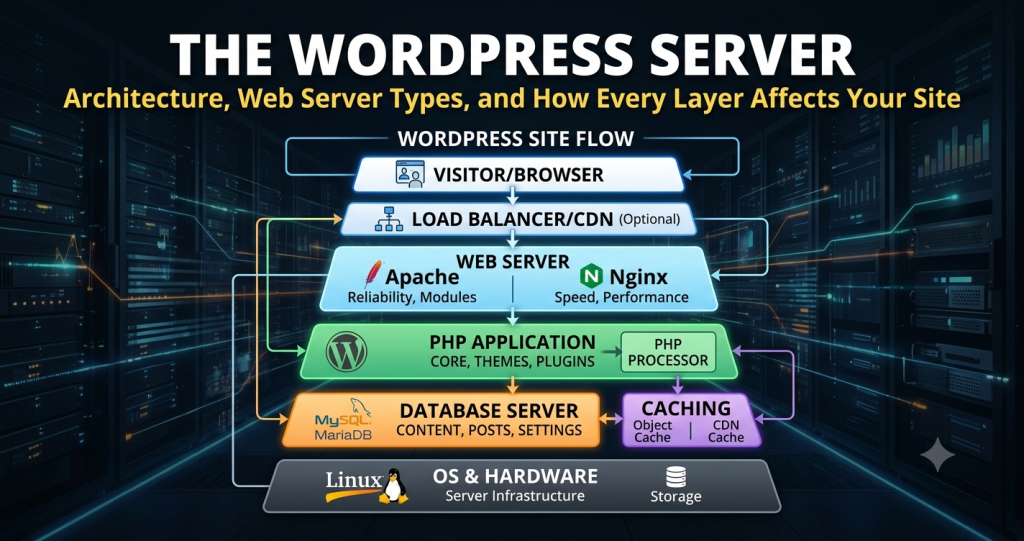
WordPress core, themes, and plugins all run on top of infrastructure you don’t directly control: the web server software (LiteSpeed, NGINX, Apache, with edge caching in front), the database server (MySQL or MariaDB), and the underlying cloud infrastructure — AWS, Google Cloud, DigitalOcean, Linode, or Vultr. A vulnerability in any layer below WordPress itself can be exploited regardless of how well your site is configured on top of it.
This is why a security plugin alone is never sufficient. A plugin operates inside the WordPress application layer. It can detect a malicious file after it’s been uploaded, but it can’t stop a DDoS flood from saturating your server’s bandwidth, and it can’t patch a vulnerability in the server software itself. That has to happen at the hosting level, through server administration and infrastructure-level protection.
DDoS Protection: Stopping the Attack Before It Reaches WordPress
A Distributed Denial-of-Service attack works by overwhelming your server with traffic until it exhausts CPU, RAM, or bandwidth — at which point your site becomes unreachable for legitimate visitors, regardless of how secure your WordPress install is. DDoS protection has to sit upstream of your server, typically at the network edge, filtering malicious traffic before it ever reaches PHP or your database.
This is infrastructure-level defense, not application-level. Shared hosting providers vary enormously in whether they include real DDoS mitigation or just rely on basic rate limiting. Cloud hosting and VPS hosting built on major infrastructure providers generally inherit network-level DDoS protection as part of the underlying platform — one of the genuine advantages of hosting built on AWS, Google Cloud, or similar providers rather than a smaller, isolated data center.
Web Application Firewall: Filtering Malicious Requests in Real Time
A Web Application Firewall (WAF) inspects incoming HTTP requests and blocks the ones that match known attack patterns — SQL injection attempts, cross-site scripting payloads, malicious file upload attempts targeting known plugin vulnerabilities. Unlike DDoS protection, which is about volume, a WAF is about content: it’s looking at what a request is trying to do, not how many requests are arriving.
A WAF is most effective when it operates at the server level, before a request reaches PHP, rather than as a plugin running inside WordPress itself. Server-level WAFs add negligible overhead because they’re integrated into the web server software stack directly — whether that’s LiteSpeed, NGINX, or Apache with a security module. This is a core part of any serious security infrastructure offering, and its presence (or absence) is one of the clearest signals of hosting quality.
SSL Certificates: Encryption as a Baseline Requirement
An SSL certificate encrypts data in transit between your server and your visitor’s browser — protecting login credentials, form submissions, and payment data from interception. There are several types relevant to WordPress hosting:
- Domain Validated (DV): the standard free certificate issued via Let’s Encrypt, sufficient for most personal, blog, and business sites.
- Organization Validated (OV): verifies the legal entity behind the domain, commonly used on business websites.
- Extended Validation (EV): the highest verification tier, often used on financial and e-commerce sites where visible trust signals matter.
- Wildcard SSL: covers a domain and all its subdomains, relevant for multisite networks and agency hosting managing multiple client subdomains.
For any site processing payments, SSL isn’t optional — it’s a baseline requirement of PCI compliance, the standard governing how cardholder data must be handled. WooCommerce hosting in particular needs to be evaluated against PCI requirements, since checkout flows, stored payment tokens, and customer data are all in scope. The certificate itself is only half the equation — your host also needs to manage automatic renewal, since an expired certificate creates the same browser warning as having no SSL at all.
Malware Scanning: Catching What Gets Through
Even with DDoS protection and a WAF in place, malware scanning is the layer that catches infections that originate from compromised plugins, outdated themes, or stolen admin credentials. Server-level malware scanning checks files against known malicious signatures and flags unexpected changes to core WordPress files — a strong indicator of compromise, since core files should never change outside of an official update.
The quality of malware scanning depends heavily on whether it runs continuously at the hosting level or only periodically through a plugin. Hosting-level scanning has access to the entire filesystem and can detect malicious files hidden outside the WordPress directory structure — something a WordPress plugin, confined to the application layer, simply cannot see.
WordPress Updates: Patching the Attack Surface
The majority of WordPress compromises don’t exploit unknown vulnerabilities — they exploit known ones in core, plugins, or themes that simply haven’t been patched. WordPress updates close these gaps, but updates also carry risk: a plugin update can conflict with your theme, or a core update can break a customization, which is why automatic updates and reliable backups have to function together.
Managed WordPress hosting typically handles core, plugin, and theme updates automatically, testing them in a staging environment before applying them to the live site — a level of process that’s difficult to replicate manually on shared hosting without dedicated tooling. The PHP version your host runs matters here too: outdated PHP versions lose security patches and eventually become an attack surface of their own, independent of WordPress.
Automatic Daily Backups: The Recovery Layer
No security layer is 100% effective, which is why automatic daily backups function as the final fallback. If DDoS protection, the WAF, and malware scanning all fail to prevent a compromise, a recent off-server backup is what turns a catastrophic loss into a routine restoration. Backups should be stored separately from the live server — backups stored on the same compromised server provide no real protection — and retained for at least 14 days to give you a clean restore point predating the incident.
This is also where database server integrity matters: a backup is only as good as its ability to restore both files and the MySQL database consistently, without orphaned references or corrupted tables.
Security Monitoring: Detecting What’s Happening in Real Time
DDoS protection, a WAF, and malware scanning are all reactive systems that act on defined rules. Security monitoring is the layer that watches for anomalies that don’t match a known signature — unusual login patterns, unexpected spikes in outbound traffic, sudden CPU usage suggesting a compromised site is being used to send spam or mine cryptocurrency. Continuous monitoring at the hosting level can flag and isolate this kind of activity before it escalates, often well before a malware scan would catch a file-based signature.
This is also part of why a host’s uptime SLA and support quality matter in a security context — a monitoring system that flags an issue is only useful if there’s a responsive team behind it that can act on the alert quickly.
How Core Files, Plugins, and Themes Tie Back to Hosting
It’s worth being explicit about why WordPress core files, plugins, and themes are inseparable from the hosting conversation rather than a separate “WordPress-level” concern:
- Core files are the foundation WordPress runs on. A host’s malware scanning checks these for unauthorized changes, and a host’s update process determines how quickly known core vulnerabilities get patched across every site on the server.
- Plugins are the single largest source of WordPress vulnerabilities, since they’re built by thousands of independent developers with varying security standards. A server-level WAF can block exploit attempts targeting plugin vulnerabilities even before the plugin developer ships a fix.
- Themes introduce risk in similar ways to plugins, particularly nulled or pirated theme files, which frequently contain backdoors baked in before you even install them. No amount of hosting-level security fully compensates for installing a compromised theme — but good hosting limits the blast radius if one slips through.
None of these three components are secured by WordPress itself. They’re secured by the infrastructure sitting underneath them — which is precisely why two sites running identical core, plugin, and theme versions can have completely different security outcomes depending entirely on where they’re hosted.
How Security Infrastructure Affects Overall Site Performance
Security and performance aren’t competing priorities — they’re connected through the same infrastructure. A server-level WAF and malware scanner add negligible latency because they’re integrated directly into the server stack, unlike security plugins that consume CPU and RAM running inside PHP on every request. A site bogged down by multiple competing security plugins often sees its time to first byte degrade, directly hurting site performance and, by extension, search rankings.
This is also where caching intersects with security: server-side caching and broader caching strategies — object caching with Redis, full-page caching, Memcached, CDN integration — reduce the load on your origin server, which means a DDoS attempt has to work harder to actually exhaust resources, since much of your traffic is being served from cache or edge nodes rather than hitting PHP and the database directly.
Matching Security Infrastructure to Hosting Type
Different hosting architectures bundle security very differently:
- Shared hosting: Security quality varies enormously by provider. Account isolation matters here specifically, since a compromised neighbor on the same server can sometimes affect others without proper isolation.
- VPS hosting / virtual servers: Greater isolation, but security configuration often becomes your responsibility unless the host actively manages it — requiring comfort with Linux server administration, SSH, and the command line.
- Cloud hosting: Inherits network-level protections from the underlying infrastructure provider, plus the ability to scale resources during an attack rather than simply being overwhelmed.
- Managed WordPress hosting: Typically the most complete bundle — WAF, malware scanning, automatic updates, daily backups, and monitoring all included and actively maintained by the host’s team.
- WooCommerce hosting: Needs explicit evaluation against PCI requirements, given the payment data involved.
What to Verify Before You Trust a Host’s Security Claims
Marketing pages routinely list “advanced security” without specifying what’s actually included. Before committing, confirm explicitly: whether DDoS protection operates at the network level or just rate-limits at the application layer; whether the WAF runs server-side or as a plugin; whether malware scanning is continuous or scheduled; whether backups are stored off-server and how many days are retained; and whether updates are tested in staging before being applied automatically. You can also verify access-level transparency — whether the host gives you cPanel, FTP, or SSH access to inspect logs and files directly, which is a reasonable proxy for how seriously a host treats server administration overall.
Security infrastructure isn’t a feature you bolt onto WordPress — it’s a property of the hosting environment WordPress runs inside. Core files, plugins, and themes will always carry some inherent risk, but whether that risk turns into downtime, data loss, or a compromised reputation is determined almost entirely by the DDoS protection, WAF, SSL management, malware scanning, update process, backup strategy, and monitoring your host provides underneath it.
